
Deciding what to publish next is one of the hardest parts of running a channel, especially when you’re trying to upload on a regular schedule. Waiting for inspiration works sometimes, but not every week.
The good news is that video ideas don’t have to come from nowhere. You can find them in a repeatable way: by looking at what your audience asks, what people search for, what’s working for other channels, what’s trending in your niche, and how your own videos perform.
A good idea meets three conditions:
It addresses something a specific audience wants to watch.
It offers an interesting angle or genuinely useful information.
You can realistically produce it.
In this guide, you’ll learn six methods for finding topics, how to evaluate and prioritize them, dozens of example ideas for different types of channels, and how to speed up research with an idea generator. None of these methods guarantee views, but together they give you a steady supply of ideas worth testing.
How to Find Ideas for YouTube Videos
Coming up with ideas is a process, not a one-time brainstorming session. The creators who rarely run out of topics don’t have better imaginations. They have a system for collecting ideas from several sources and a place to keep them.
Start with three questions: What is your niche? Who are you making videos for? What problems, interests, or goals do those viewers have? The answers give you the boundaries for everything below.
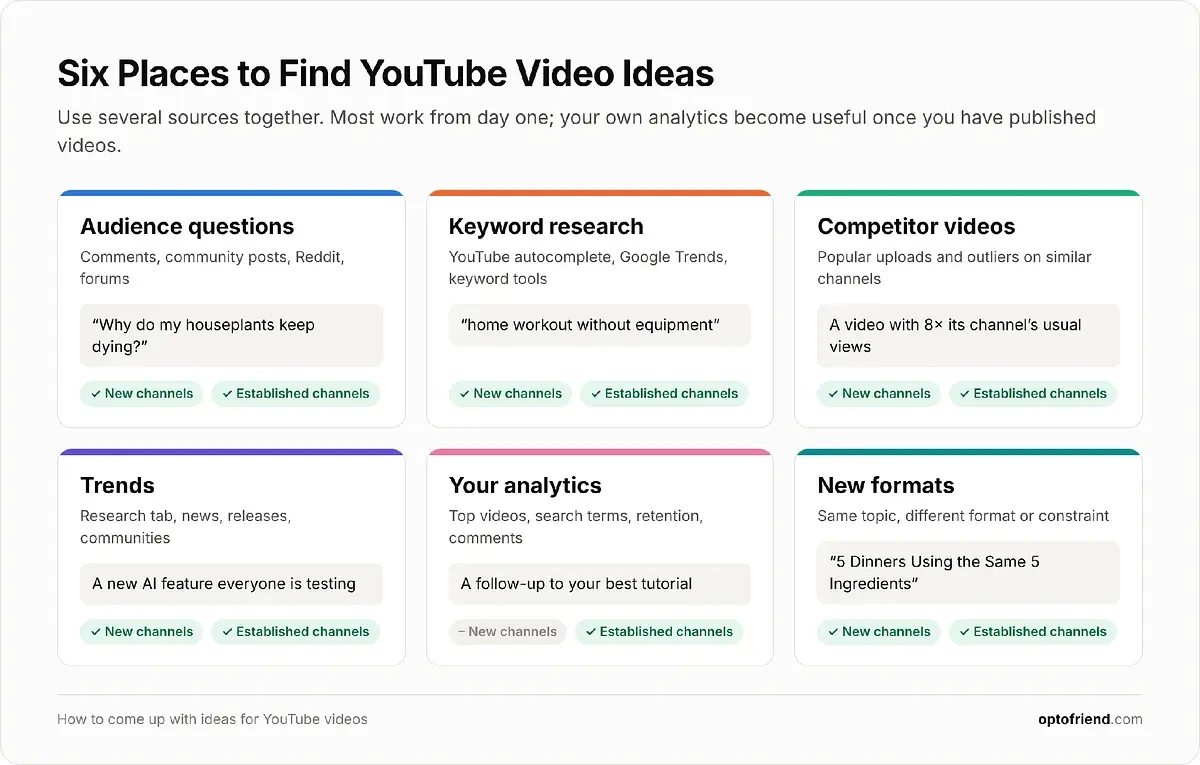
How do YouTubers find ideas for videos? Most combine several sources: viewer questions, keyword research, competitor videos, trends, and their own analytics. Each source reveals something different, so using them together gives you a bigger and more reliable pool of ideas than any one method alone.
1. Start With Your Audience’s Questions and Interests
Viewers’ questions, frustrations, and goals are some of the best starting points for videos, because they tell you exactly what someone wants to know, in their own words. Good places to look:
Comments on your own videos, especially questions and requests for follow-ups.
Questions under competitors’ videos that the creator didn’t answer.
Community posts and polls on YouTube, where you can ask your audience directly.
Reddit communities and topic-specific forums, where people describe their problems in detail.
Frequently asked questions in your niche, from Q&A sites, product support pages, or “People also ask” boxes in Google.
Customer questions or your own experience, if you run a business or have learned the topic yourself.
To turn a recurring question into a video, look at the problem behind it and think about different ways to answer it.
Audience question: “Why do my houseplants keep dying?”
Possible videos:
“5 Reasons Your Houseplants Keep Dying”
“How to Save an Overwatered Houseplant”
“I Tested 3 Ways to Revive a Dying Plant”
The same problem supports a list, a tutorial, and an experiment. It could also become a comparison (“Self-Watering Pots vs Regular Pots”) or a personal story (“Every Houseplant I Killed and What I Learned”).
Tip: keep a document or spreadsheet of recurring questions as you come across them. Once a month, group them into themes. A theme that keeps coming up is a strong candidate for a video or even a series.
2. Use YouTube Keyword Research to Discover Video Topics
Keyword research shows you the language people use when they search for videos, and it helps you find topics with existing interest. It’s one of the most reliable ways to find ideas for a new channel, because it doesn’t depend on having an audience yet.
It helps to separate three things that are often confused:
A broad subject: “home workouts.” Too wide to be a single video.
A specific search query: “home workout without equipment.” This is what someone actually types.
A finished video concept: “20-Minute Full-Body Workout Without Equipment.” This is what you make.
Keyword research takes you from the first to the second. Your creativity takes you from the second to the third.
Find Keywords With YouTube Autocomplete
YouTube’s search suggestions are the quickest free source of real search phrases:
Open YouTube and enter a broad keyword connected to your niche, such as “home workout.”
Review the autocomplete suggestions that appear below the search bar.
Add modifiers to the keyword, such as how to, best, for beginners, without, vs, mistakes, or review, and check the new suggestions.
Explore longer phrases and related questions by adding a letter or word after the keyword.
Save promising suggestions in your topic list.
Search each phrase and look at the videos already covering it.
Worked example. Starting with “home workouts,” autocomplete might lead you to phrases like these:
home workout without equipment
beginner home workout
15 minute home workout
home workout for small apartments
home workout mistakes
Combine the phrases into one viewer-focused title: “15-Minute Beginner Workout You Can Do in a Small Apartment.” It covers three search phrases at once and makes a clear promise.
Autocomplete tells you that people search for a phrase, but not how often. Don’t treat the order of suggestions as a reliable ranking of search volume: suggestions can also vary with location, language, and your own search history.
Find Content Opportunities in YouTube Studio
YouTube Studio has its own research features, and they’ve changed a lot recently, so what you see depends on your account and device.
On desktop, open YouTube Studio and go to Insights → Research. Insights is the new name for the Analytics page on desktop, and the Research tab replaces the older Trends tab. If your account hasn’t switched yet, look for research features under Analytics → Trends or the older Analytics → Research tab instead.
The new Research tab focuses on outlier videos: videos that perform well above their channel’s usual level. You can use it to investigate:
Popular videos related to a topic, by searching for a subject and sorting or filtering by views.
Videos your audience watches on other channels, using the “Watched by my viewers” filter.
Recently published videos, by narrowing the upload date to spot emerging topics and formats.
Videos significantly outperforming their channel, using the outlier score. A 5× score means the video received five times the views of the channel’s earlier uploads in the same format.
Audience interests and possible content gaps, by looking for subjects your viewers watch elsewhere that your channel hasn’t covered yet.
Other filters include video type, subscribers, duration, and channel age, which help you compare channels similar in size to yours. If your account still has the older research tool, its “Searches across YouTube” and “Your viewers’ searches” tabs show popular searches for a topic, and a content gap filter highlights searches where viewers couldn’t find the content they wanted.
Use what you find to choose topics and spot formats worth trying, not to copy specific videos. If several outliers in your niche are, say, side-by-side comparisons, that format may be worth testing with your own subject.
Ask Studio, YouTube’s AI assistant in Studio, is another way to brainstorm when it’s available to you. You can ask it about the topics your audience responds to, request new angles for a series, or have it summarize the title patterns behind top outlier videos. YouTube is phasing out the older Inspiration tab and pointing creators to Ask Studio for brainstorming. Treat its suggestions as starting points that need your judgment.
Check Demand and Trends With Google Trends
Google Trends shows whether interest in a subject is growing, declining, seasonal, or relatively stable. Here’s how to use it for YouTube:
Open Google Trends.
Enter a potential topic.
Set the country and time period. Use at least the past five years to see long-term patterns.
Change the search type from Web Search to YouTube Search.
Add related terms to compare them.
Review interest over time and the related queries at the bottom of the page.
Pay attention to the shape of the line. A steady line suggests stable, long-term interest. A line that peaks at the same time every year is seasonal. A sudden spike that quickly drops off is a short-lived trend.
Example: compare “home workout” with “new year fitness challenge” over five years. If the challenge term only rises around January while the general term stays steadier, that tells you to publish challenge videos ahead of the new year and save general workout videos for the rest of the calendar.
Keep in mind that Google Trends shows relative interest on a scale from 0 to 100, normalized to the highest point in the selected period. It doesn’t show actual search volume, so use it to compare terms and spot patterns, not to estimate how many people will watch your video.
Expand Keywords Using Research Tools
Third-party tools such as Ahrefs (whose Keywords Explorer can show YouTube data), vidIQ, and TubeBuddy can add to what YouTube shows you. Use them to:
Expand a seed keyword into dozens of related queries.
Find question-based searches and long-tail variations, such as “why does my squat hurt my knees.”
Compare their estimates of demand and competition between similar topics.
Group overlapping queries into a single video concept instead of making near-duplicate videos. “Beginner home workout” and “easy home workout for beginners” belong in the same video.
Remember that these metrics are estimates, not YouTube’s own data. When a tool offers YouTube-specific data, prefer it over web search volumes, because what people search for on Google and on YouTube can differ significantly.
Turn Keywords Into Video Concepts
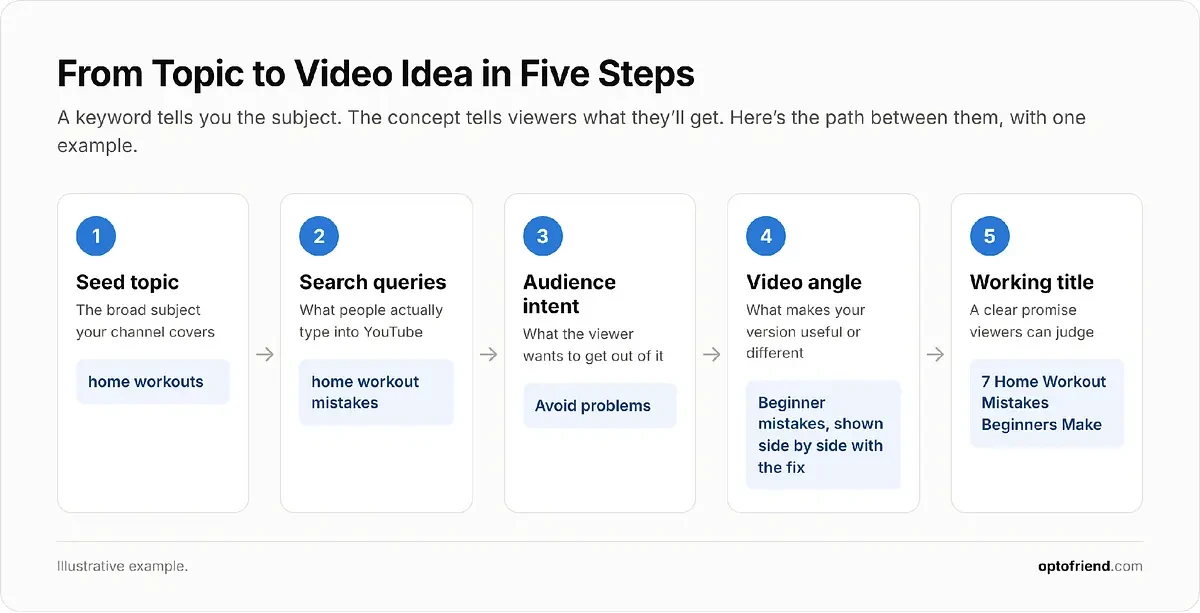
A keyword identifies the subject. A video concept specifies what viewers will experience or learn. Here’s how the home workout phrases can become concrete ideas:
Search query |
Audience intent |
Possible video idea |
|---|---|---|
home workout without equipment |
Learn a routine |
20-Minute Full-Body Workout Without Equipment |
beginner home workout |
Get started |
Your First Home Workout: 6 Simple Exercises |
home workout mistakes |
Avoid problems |
7 Home Workout Mistakes Beginners Make |
home workout small apartment |
Work around constraints |
Quiet Apartment Workout With No Jumping |
home workout results |
Evaluate effectiveness |
I Tried Home Workouts for 30 Days: My Results |
You can repeat this for any topic with a simple process: seed topic → search queries → audience intent → video angle → working title.
3. Analyze Competitors and Their Best-Performing Videos
Competitor research shows you what viewers in your niche already respond to. The goal isn’t to copy other videos, but to understand which subjects, formats, and angles work, and where there’s room for something better.
Identify 5 to 10 relevant channels in your niche, ideally including some that are similar in size to yours.
Review their most popular videos and their recent uploads.
Record recurring subjects, title structures, formats, and publishing dates in a spreadsheet.
Compare the performance of videos on the same channel.
Identify unusually successful videos and look for what makes them different.
Read the comments for unanswered questions and requests for follow-ups.
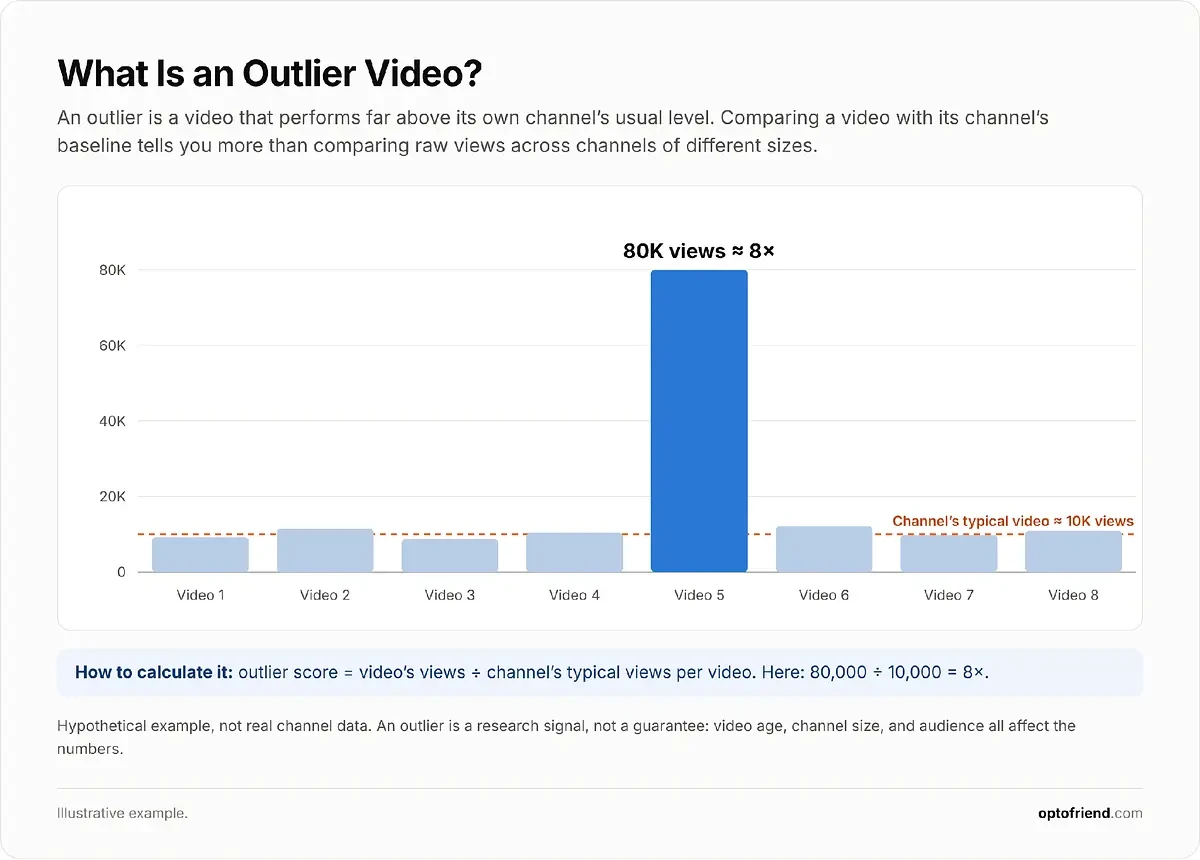
Step 5 is where the most useful insights usually come from. Look for video outliers: videos that perform substantially better than their channel’s typical videos.
Comparing a video with its own channel’s baseline is more informative than comparing raw views between channels. A video with 50,000 views is unremarkable on a channel with 2 million subscribers, but it’s a strong signal on a channel whose videos usually get 5,000.
Example: imagine a cooking channel whose videos usually focus on full recipes. One video about a single technique, such as “How to Cut an Onion Without Crying,” gets several times its usual views. That could suggest interest in a narrow subject (basic knife skills), a surprising angle, or a shorter format worth testing in your own way.
High views alone don’t prove a topic will work for you. The video’s age, the channel’s size and history, and differences between audiences all affect the result. Treat outliers as research signals, then decide whether you can offer something original on the same subject.
4. Discover Trending Topics Before They Become Oversaturated
Trends can create opportunities for timely videos, especially when you cover them early and from your channel’s angle.
How can you find trending video topics? Watch several sources at once:
YouTube Studio’s Research tab, filtered by recent upload dates.
Google Trends, with YouTube Search selected.
Industry news and major announcements.
Reddit and other communities in your niche.
New products, games, software versions, and cultural releases.
Emerging discussions among creators and experts in your field.
The key is to adapt a trend to your established audience rather than chasing unrelated viral topics. Example: when a new AI feature launches, a technology creator could make a tutorial (“How to Use [New Feature] to Summarize Long Documents”), a comparison (“[New Feature] vs [Older Tool]: Which Is Faster?”), or a hands-on test (“I Used [New Feature] for a Week of Real Work”). A cooking channel probably shouldn’t cover it at all.
Not all trends behave the same way:
Breaking trends are time-sensitive and require fast production, often within days.
Seasonal trends return around predictable events, such as holidays, back-to-school season, or the new year, so you can plan them weeks ahead.
Longer-lasting trends are emerging interests that can support multiple videos over months.
Before committing to a breaking trend, be honest about your production speed. If a video takes you three weeks to make, a seasonal or longer-lasting trend is usually a better use of your time.
5. Use Your Existing YouTube Analytics to Find New Ideas
Once you have a few published videos, your own analytics become one of the best idea sources, because they show what your specific audience responds to. Look at:
Videos generating the most views over the last few months, not just all time.
Videos attracting new viewers, which show which topics bring people to your channel.
Search terms bringing viewers to your videos, in the YouTube search traffic source report, when available.
Audience retention and engagement, to see which parts of videos hold attention.
Topics attracting questions in comments.
Videos your audience watches on other channels, where available in your audience reports or the Research tab.
Then turn those observations into ideas:
Create a follow-up to a successful tutorial, such as an advanced version or a common-problems video.
Update a guide after a significant product or platform change.
Explore a subtopic that comes up repeatedly in comments.
Turn one successful concept into a recurring series.
Rework an underperforming topic if its execution, rather than the subject itself, seems to be the problem: for example, if retention dropped after a long introduction.
Build on what works without simply remaking the same video. Each follow-up should give viewers something new.
6. Experiment With New Formats and Creative Angles
Changing how you present a topic can produce a fresh idea without leaving your niche. These are original creative concepts rather than search-driven topics: their value comes from the premise, not from a keyword.
Basic topic |
Alternative video concept |
|---|---|
Beginner photography tips |
I Took 100 Photos Using Only One Lens |
Budget cooking |
5 Dinners Using the Same 5 Ingredients |
Learning guitar |
I Practiced Guitar for 30 Days: What Changed? |
Productivity advice |
I Tried 3 Productivity Methods for a Week |
Travel recommendations |
Tourist Traps vs Local Favorites |
Useful formats to rotate through include tutorials, challenges, experiments, comparisons, interviews, reactions, myth-busting, personal stories, and mini-documentaries. You can create new combinations by pairing a familiar subject with a different format, audience, constraint, or point of view.
Whichever methods you use, aim to collect more ideas than you can produce right away. A long list gives you room to choose the strongest ones, which is what the next section is about.
How to Choose Which YouTube Video Ideas Are Worth Making
Twenty ideas don’t mean twenty videos worth making. The next step is to narrow a long list into a short, realistic plan.
How do you know if a YouTube video idea is good? A good idea has evidence that viewers want it, a clear angle that makes your version worth watching, a natural fit with your channel, and a scope you can actually produce. The four checks below cover each of these.
Check Audience Demand and Competition
Look for evidence that viewers want the subject:
Relevant autocomplete suggestions or searches in the Research tab.
Repeated viewer questions in comments or communities.
Existing videos on the topic attracting interest, especially outliers.
Trending or recurring interest in Google Trends.
Questions that competitors haven’t answered well.
High competition isn’t automatically a reason to drop a topic. You may still stand out with a clearer explanation, a different perspective, a better demonstration, or a more specific audience. A topic with no competition and no evidence of demand is often riskier than a popular one you can approach differently.
Find a Unique Angle for Each Idea
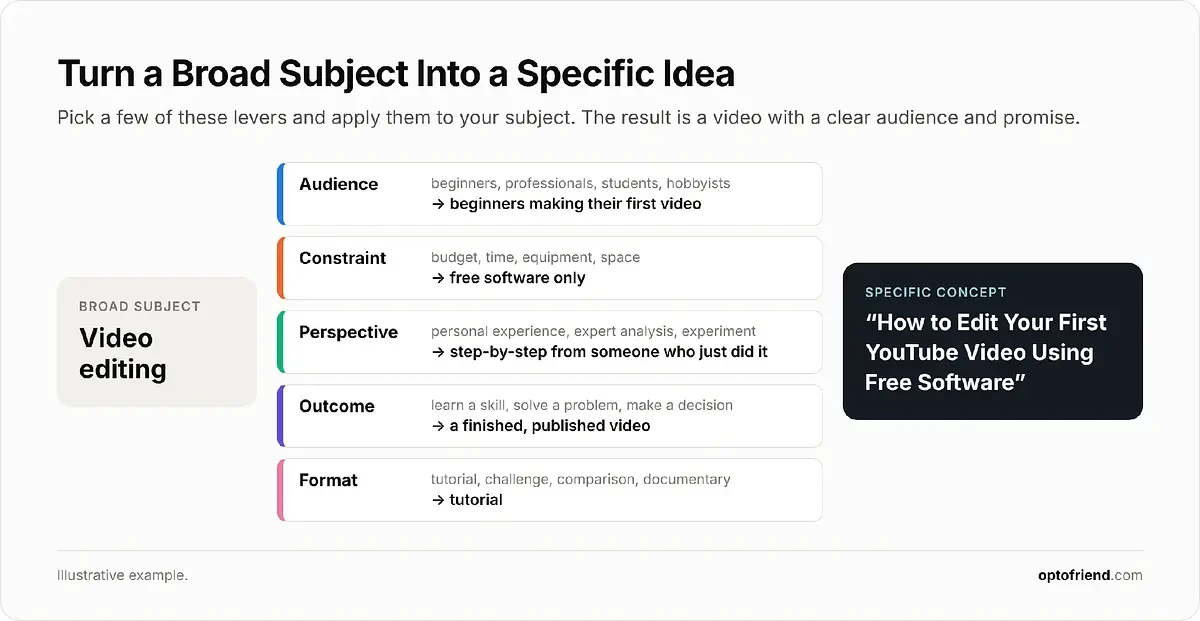
Choosing a subject is only the beginning. To make a broad concept specific, adjust one or more of these levers:
Audience: beginners, professionals, students, hobbyists.
Constraint: limited budget, time, equipment, or space.
Perspective: personal experience, expert analysis, or an experiment.
Outcome: learn a skill, solve a problem, make a decision.
Format: tutorial, challenge, comparison, documentary.
Example: the broad subject “video editing” becomes “How to Edit Your First YouTube Video Using Free Software.” This version promises a specific outcome (a finished first video) under a specific constraint (free software) for a specific audience (complete beginners). Viewers can tell from the title alone whether it’s for them.
Check Whether the Idea Is Realistic to Produce
Before committing, consider what the video actually requires: filming equipment, available footage, your level of expertise, research time, editing effort, budget, and access to locations or interview subjects.
If you’re new, start with narrower ideas you can finish in a reasonable time. A focused ten-minute tutorial you publish this week will teach you more about production and your audience than an ambitious documentary that takes two months.
Rank Your Ideas Before Filming
A simple scoring system makes comparisons easier. Rate each idea from 1 to 5 on five criteria:
Audience interest
Evidence of demand
Originality or differentiation
Relevance to your channel
Production feasibility
Here’s an example for a beginner photography channel:
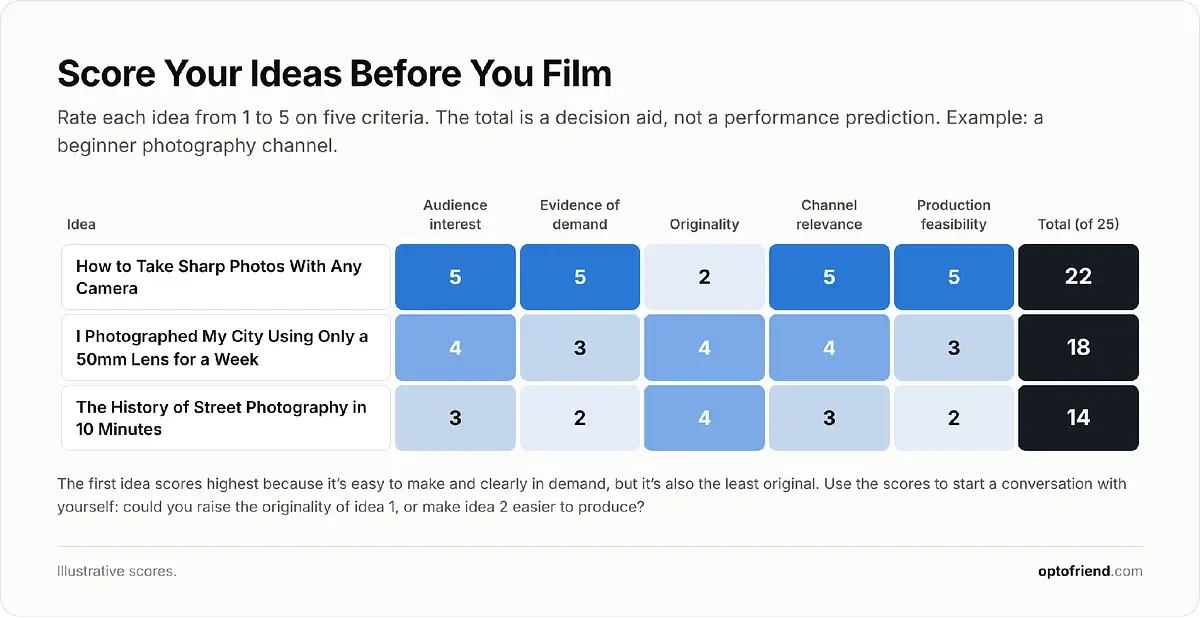
Scoring is a decision-making aid, not a performance prediction. The goal is to find ideas that balance value for your audience with your strengths and resources, and to notice where an idea could be improved, such as adding a stronger angle to a topic that’s easy to make but not very original.
Faceless YouTube Channel Ideas
Faceless channels don’t show the creator on camera. People choose this format for privacy, because they don’t have filming equipment, or because they prefer narration, screen recordings, animation, or other visuals. Faceless doesn’t mean effortless: good faceless videos still take real research, scripting, editing, and original creative work.
Here are ten concepts, with example titles and what you’d need to produce them:
Animated explainers about science or history. “What Actually Happens Inside a Black Hole?” Visuals: simple 2D animation or motion graphics.
Software tutorials using screen recordings. “How to Build a Budget Tracker in Google Sheets.” Visuals: screen capture with zoom-ins and callouts.
Narrated historical mysteries. “The Ship That Was Found Sailing With No Crew.” Visuals: archival images, maps, and documents with proper permissions.
Budget travel guides using original footage. “How to Spend 3 Days in Lisbon on a Budget.” Visuals: your own handheld or phone footage, with narration.
Book analysis and recommendations. “5 Books That Explain How Money Really Works.” Visuals: book shots, text overlays, and illustrations.
Programming tutorials and coding projects. “Build a Weather App With Python in 30 Minutes.” Visuals: code editor recordings.
Original guided meditation or ambient content. “10-Minute Guided Breathing for Stressful Workdays.” Visuals: calm original footage and your own voiceover or music.
Educational mini-documentaries. “Why Shipping Containers Changed the World.” Visuals: maps, charts, licensed footage, and narration.
Data visualization and statistics explainers. “How People Spend a Typical Day, Visualized.” Visuals: animated charts built from reliable public data.
Hands-on craft tutorials filmed from above. “How to Make a Leather Wallet With Basic Tools.” Visuals: an overhead camera showing only your hands.
To find ideas that suit this format:
Look for informational searches where viewers want answers rather than a personality, such as “how does X work” or “history of X.”
Study successful narration-based formats in your niche and note how they structure their videos.
Choose subjects that can be explained through graphics, demonstrations, or your own footage.
Ask whether viewers value the information, the experience, or the story more than seeing the presenter.
A note on copyright and reused content: only use stock footage, music, and images you have permission to use, and check each license. YouTube’s monetization policies also restrict reused content that doesn’t add significant original value. Simply assembling other people’s clips or reading articles aloud over stock footage isn’t a sustainable channel. Your research, script, analysis, and editing are what make the video yours.
First YouTube Video Ideas
Picking the first video is hard because a new channel has no performance data to learn from. The good news is that the best YouTube video ideas for beginners are usually simple: something you know well, aimed at a specific viewer, in a format you can finish.
Your first video doesn’t have to introduce you. A useful tutorial, a clear explanation, or an interesting challenge can show viewers what your channel offers right away.
How do you come up with a YouTube video idea when you have no subscribers? Rely on the methods that don’t need your own data: keyword research, audience questions in communities, and competitor research on similar-sized channels. Then pick a topic you can demonstrate confidently.
Here are ten first-video ideas you can adapt:
“Why I Started This Channel and What You’ll Learn”: easy to make, but only useful if you clearly explain what viewers will get. Best as a short addition, not your only first video.
“5 Things I Wish I Knew Before Learning Photography”: easy to produce and works for any skill you’ve already learned.
“How to Make Your First Digital Illustration”: a searchable tutorial that shows your skills from the start.
“My Budget Desk Setup for Working From Home”: simple to film, and it naturally leads to follow-ups on individual products.
“I Tried Learning Spanish for 7 Days”: a beginner-friendly challenge that documents a real journey.
“3 Common Mistakes Beginner Guitarists Make”: short, practical, and based on recurring questions.
“How to Cook 3 Easy Meals With Basic Ingredients”: useful to a broad audience and easy to film in your kitchen.
“My First Week Learning Python”: a progress diary that can grow into a series.
“Testing a Popular DIY Technique for the First Time”: an experiment with a built-in reason to watch until the end.
“Beginner’s Guide to [Specific Topic]”: more work to research, but a strong, long-lasting resource if you know the subject well.
To pick your first topic:
Start with something you understand or can demonstrate.
Identify a specific audience.
Find one clear problem, question, or interesting premise.
Use keyword research to check that people search for the subject.
Choose a manageable format and scope.
Plan the next few related videos so the channel has a coherent direction from the start.
Treat your early videos as experiments. Each one teaches you something about production, about what your audience responds to, and about which ideas are worth repeating.
Gaming YouTube Video Ideas
Gaming content goes far beyond recording gameplay. It helps to think in three categories:
Search-driven videos answer specific player questions: guides, walkthroughs, builds, and fixes.
Entertainment-focused videos rely on personality, challenges, and storytelling.
Release and update videos cover new games, patches, and seasons while interest is high.
Some formats to explore, with example titles:
Beginner’s guides for specific games: “10 Minecraft Building Mistakes Beginners Make.”
Boss fights and difficult missions: “How to Beat [Boss] Without Rare Equipment.”
Character builds and equipment: “The Best Early-Game Build for a Stealth Character in [Game].”
Hidden mechanics or secrets: “The Most Overlooked Mechanics in [Game].”
Self-imposed challenges: “Can You Finish Stardew Valley Without Buying Seeds?” or “I Tried Completing [Game] Using Only [Restriction].”
Comparisons between games or versions: “Original vs Remake: What Actually Changed?”
Lore explanations and theories: “The Complete Story of [Game] Explained.”
Reviews after extended playtime: “[Game] After 100 Hours: Is It Still Worth Playing?”
Speedrun attempts and learning experiences: “I Tried to Learn a Speedrun in One Week.”
Tips after major updates: “Everything That Changed in the Latest [Game] Update.”
To research gaming topics:
Use YouTube autocomplete with game titles and modifiers, such as “[game] tips,” “[game] best build,” or “[game] how to beat.”
Read game-specific Reddit communities for recurring questions and frustrations.
Check Steam reviews and player feedback for what players love and struggle with.
Follow patch notes and upcoming releases.
Look for popular videos from smaller channels, which are often outliers worth studying.
Collect frequently asked questions about specific mechanics.
A single game can support many specific videos. For example, “Minecraft survival” can become a beginner’s first-night guide, a farm design tutorial, a hardcore challenge, a comparison of starter bases, and an explanation of a confusing mechanic.
Keep in mind that guides are often tied to a specific game version and may need updating after patches, while challenges, retrospectives, and broader analysis tend to stay relevant longer.
Evergreen YouTube Content Ideas
Evergreen content covers topics with relatively durable viewer interest, the kind of questions people keep asking year after year. Trending content, by contrast, peaks quickly and fades. Evergreen doesn’t mean “never changes,” though: videos about products, software, or financial rules may still need updates as things change.
Common types of evergreen videos:
Beginner tutorials for fundamental skills.
Basic cooking techniques.
Educational explanations of core concepts.
Foundational music theory lessons.
Everyday troubleshooting guides.
Personal finance fundamentals.
Language-learning exercises.
Product maintenance tutorials.
Historical explainers.
Creative skill demonstrations.
Example titles:
“How to Read Sheet Music for Beginners”
“How to Sharpen a Kitchen Knife Safely”
“What Is an Interest Rate and How Does It Work?”
“How to Understand Aperture, ISO, and Shutter Speed”
“How to Fix Common Bicycle Gear Problems”
To find evergreen topics with keyword research, look for:
Long-term patterns in Google Trends: a relatively steady line over five years or more.
Questions that keep coming up in comments and communities.
Fundamental skills in your niche that every beginner needs.
Search queries with stable intent, such as “how to” and “what is” phrases.
Older videos, yours or competitors’, that still attract relevant views.
Evergreen topics also work well as connected series and playlists, where each video covers one part of a skill.
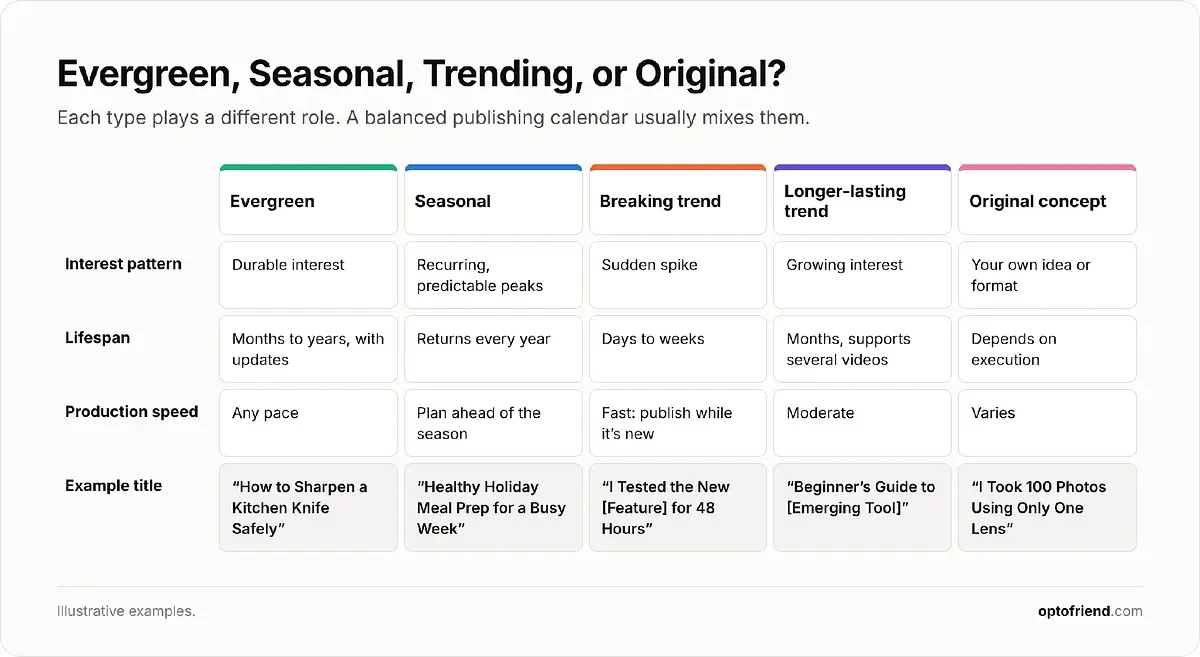
A balanced publishing calendar usually mixes these types: evergreen videos for a steady foundation, seasonal videos planned ahead of predictable peaks, and trending or original ideas for timely, distinctive content. Evergreen videos aren’t guaranteed to rank or keep getting views, and they still need occasional maintenance, but they give your channel a base that doesn’t depend on the news cycle.
Video Essay Topic Ideas
A video essay uses research, narrative structure, examples, and commentary to explore a question, interpret a subject, or defend an argument. Unlike a tutorial, it isn’t about teaching a skill, and unlike a review, it isn’t mainly about whether something is good. It’s about why something is the way it is.
Essay subjects often come from:
Unanswered questions about popular subjects.
Conflicting interpretations of books, films, or games.
Historical events and cultural developments.
Recurring themes in art and entertainment.
Surprising connections between seemingly unrelated topics.
Underexplored stories, ideas, or controversies.
Ten possible subjects with working titles:
“Why Horror Movies Make Ordinary Places Terrifying”
“How Video Games Tell Stories Without Dialogue”
“The History of the Modern Office”
“Why Some Movie Villains Are More Memorable Than Heroes”
“How Music Changes the Meaning of a Film Scene”
“The Rise and Fall of Minimalist App Design”
“Why Nostalgia Is So Powerful in Video Games”
“How Cities Shape the Stories We Tell”
“Why Some Science Fiction Predictions Never Came True”
“How the Internet Changed the Way We Experience Music”
The key is turning an interesting subject into a focused question or thesis:
Broad topic: horror films.
Research question: why are ordinary homes such common settings for psychological horror?
Video concept: “Why the Safest Place in Horror Movies Becomes the Scariest.”
The question gives the essay a direction, and the title turns it into a promise viewers want answered.
Research your essay using primary sources, reliable publications, interviews, books, and the works you’re analyzing. Verify factual claims, cite your sources in the description, and use copyrighted clips or audio carefully: short excerpts that support your commentary are very different from long, unaltered sections, and fair use rules vary by country.
How to Organize YouTube Video Ideas Into a Content Plan
Finding ideas becomes much more valuable when you keep them in a reusable backlog instead of starting every planning session from zero.
Build a Video Idea Database
Keep a simple spreadsheet, Notion database, or similar document with these fields:
Field |
What to record |
|---|---|
Idea |
Working video concept or title |
Topic / Keyword |
Main subject or relevant search query |
Source |
Autocomplete, competitor, comments, trend, etc. |
Format |
Tutorial, essay, challenge, review, Short |
Demand Evidence |
Search interest, audience request, competitor performance |
Priority |
High, Medium, Low |
Effort |
Estimated production complexity |
Status |
Backlog, Researching, Planned, Filming, Published |
Here’s what a few rows might look like for a home workout channel:
Idea |
Topic / Keyword |
Source |
Format |
Demand evidence |
Priority |
Effort |
|---|---|---|---|---|---|---|
Quiet Apartment Workout With No Jumping |
home workout small apartment |
Autocomplete |
Tutorial |
Autocomplete + comment requests |
High |
Low |
7 Home Workout Mistakes Beginners Make |
home workout mistakes |
Autocomplete |
List |
Recurring Reddit questions |
High |
Low |
I Tried Home Workouts for 30 Days: My Results |
home workout results |
Competitor outlier |
Challenge |
Outlier on a similar channel |
Medium |
High |
A database like this keeps ideas from getting lost and makes it easy to compare opportunities when you plan your next videos.
Turn One Topic Into a Video Series
Topic clustering means making several related videos that each cover a different part of a broader subject. For example, a beginner photography series could include:
Understanding Camera Settings
How to Take Sharp Photos
Natural Light Photography for Beginners
Portrait Photography Mistakes
Editing Your First Photos
Related videos give your channel a clear identity and encourage viewers to watch more of your content. Each video should still offer distinct value, though, rather than repeating the same explanation with a slightly different title.
Maintain a Balance Between Planned and Experimental Content
Leave room for both research-driven videos and experiments. A simple process:
Maintain a backlog of validated topics.
Select ideas for the upcoming publishing period.
Leave room for time-sensitive opportunities.
Review results after each video is published.
Add new ideas based on audience responses.
How many video ideas should you plan in advance? There’s no universal number, and it depends on how often you publish. A practical rule is to keep your backlog larger than your next publishing period, so you always have options to choose from, while leaving gaps for trends and experiments.
How to Use the Video Ideas Generator From Optofriend
Can AI help generate YouTube video ideas? Yes, as long as you treat its suggestions as starting points that need human review.
Optofriend’s YouTube video ideas generator takes a different approach from generic AI brainstorming: it researches variations of your topic and analyzes competitor videos before suggesting ideas. Here’s how to use it to turn a broad subject into concrete video concepts.
Step 1: Enter a Topic or Keyword
Open the tool and find the Topic of interest (keywords) field. Enter a subject connected to your niche, for example:
budget travel
Minecraft survival
beginner photography
healthy meal prep
A reasonably specific seed topic usually produces more focused research than a very broad one. “Beginner photography” gives the tool a clearer direction than “photography,” and “healthy meal prep” is more useful than “food.”
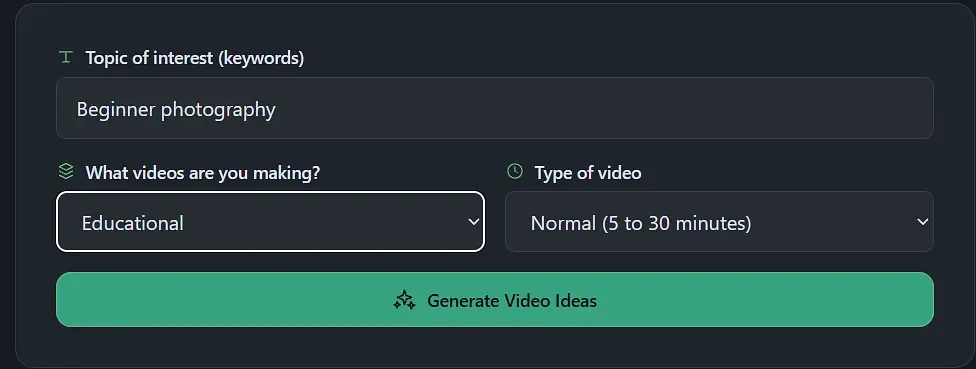
Step 2: Select the Video Preferences
Next, fill in the two selection fields:
What videos are you making?
Type of video
Choose the options that best match the content you plan to make and the audience you’re making it for. These selections give the tool additional context, so the ideas it generates fit your channel.

Step 3: Generate Video Ideas
Click Generate Video Ideas. Instead of returning an unverified list of generic subjects, the tool researches topic variations and analyzes relevant competitor videos. According to the tool’s published workflow, it retrieves and scores a set of the top ten competitor videos for those topic variations.
This shows you which approaches other channels have already tried, which saves you from manually searching each variation yourself.
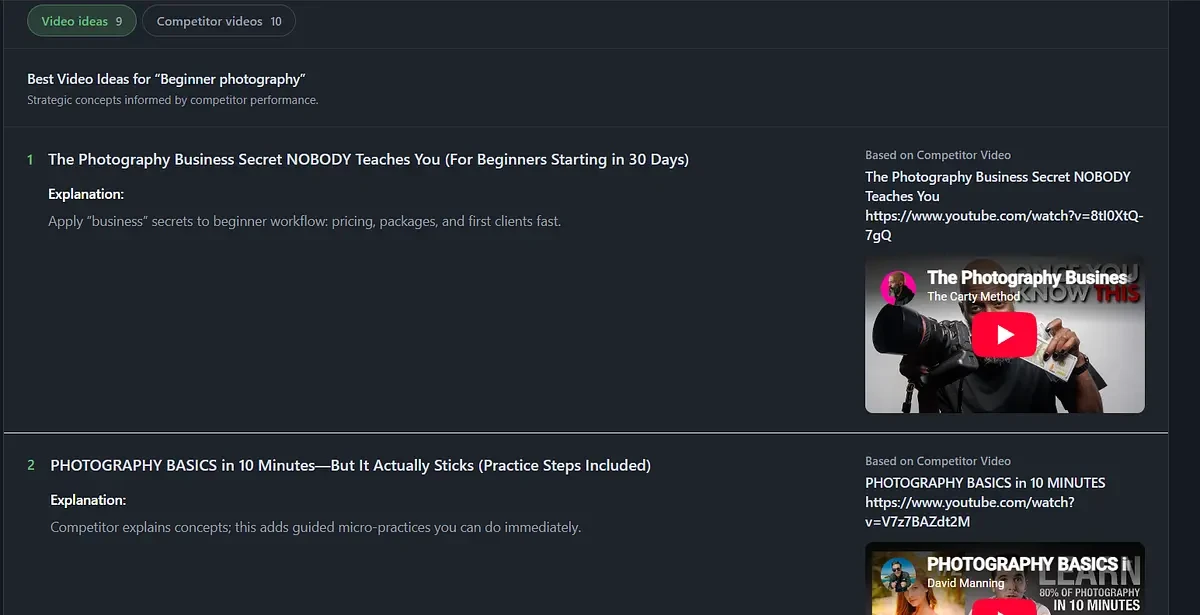
Step 4: Examine Competitor Videos and Outliers
The tool highlights videos that performed unusually well compared with their channel’s average. In simple terms, an outlier is a video that did much better than the channel’s other videos usually do.
Illustrative example: a channel normally gets around 10,000 views per video, but one video gets 80,000. That video has roughly eight times the channel’s usual view count. (This is a hypothetical calculation, not an actual result from the tool.)
For each outlier, look at:
Which topic the video covers.
How the title frames the idea.
Which audience it seems to target.
Whether it uses a distinctive format or angle.
Whether you could offer an original improvement.
An outlier is a useful research signal, not a guarantee that the same topic will perform well for you.
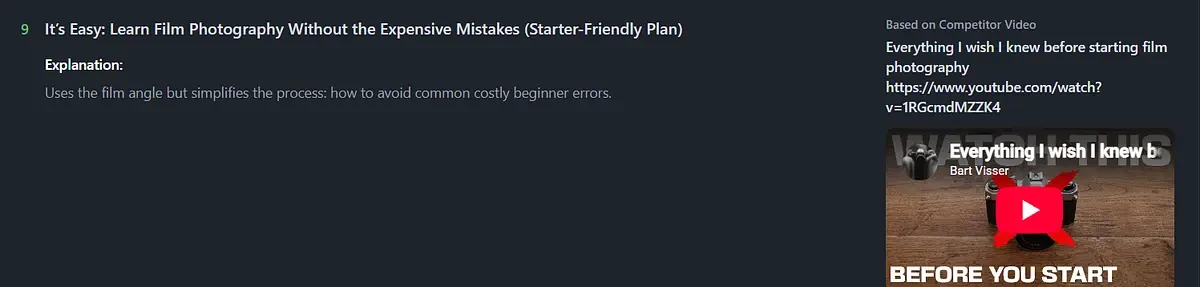
Step 5: Review the Generated Video Ideas
Based on the researched topics and the approaches that worked for competitors, the tool produces ten suggested video concepts. Review them and pick the ones that best fit your channel, using the same criteria as before:
Audience relevance
Originality
Production requirements
Topic interest and supporting evidence
Generated ideas are starting points. You can adapt them, combine two into one stronger concept, or make them more specific with an audience, constraint, or format.
Step 6: Refine an Idea and Add It to Your Content Plan
To turn one suggestion into a production-ready concept:
Choose the most promising idea.
Identify the audience and the central question the video answers.
Decide what unique information or perspective you’ll contribute.
Draft a clear working title.
Outline the main points or scenes.
Add the concept to your idea database.
Try different seed keywords and compare the results before deciding what to make. The generator won’t replace your judgment, but it can cut down the manual research and help you get from a general interest to concrete video concepts much faster.
Conclusion
Good YouTube ideas can come from many places: keyword research, audience questions, competitor videos, trends, your own analytics, and your own creativity. What matters most is having a repeatable workflow:
Discover a topic → research audience demand → identify a unique angle → evaluate feasibility → plan the video.
Instead of waiting for inspiration, keep collecting ideas, test them, and refine them based on what your audience responds to. You don’t need a perfect idea to start, just a promising one you can make well. Pick one topic from your list today and turn it into your next video.