
Tags are crucial for content discovery: they need to be descriptive and, most importantly, match the keywords people actually search for. If you struggle to understand how YouTube tags work and how to use them, you’ve come to the right place. In this article, we will cover everything you need to know about video tags, from theory to practical use.
What Are YouTube Video Tags
Tags are descriptive keywords that help viewers find your video in search and give YouTube extra context about what it covers.
It’s important to note that:
YouTube does not present tags as a major ranking factor. Their primary documented purpose is handling misspellings.
The 500-character limit is combined, not per tag, and includes separators and additional characters counted for phrases.
Tags and hashtags are different metadata elements with different rules and discovery functions.
There is no official recommendation to use a specific number of video tags or to fill the entire 500-character allowance, and spamming tags is explicitly discouraged.
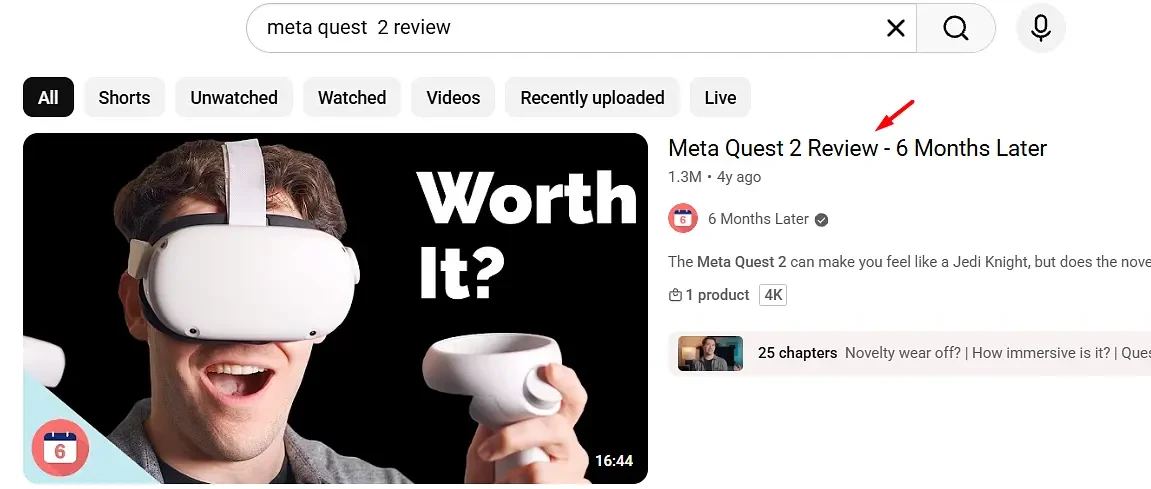
YouTube tags are especially useful if the topic of your video can be (and often is) misspelled or goes by several names. For example, viewers may search for “Meta Quest 2 review” or “Oculus Quest 2 review” (the two are interchangeable). Based on your keyword research, you may find that the first variation has more search volume and is more widely known, so you use it in the title and put “Oculus Quest 2” in the list of tags.
For example, the tags for such a review could look like this:
Meta, Quest 2, Oculus, Facebook, Android, Beat Saber, Review, 6 Months Later, Chromecast, Oculus App, Oculus Store, Quest Store, Games.
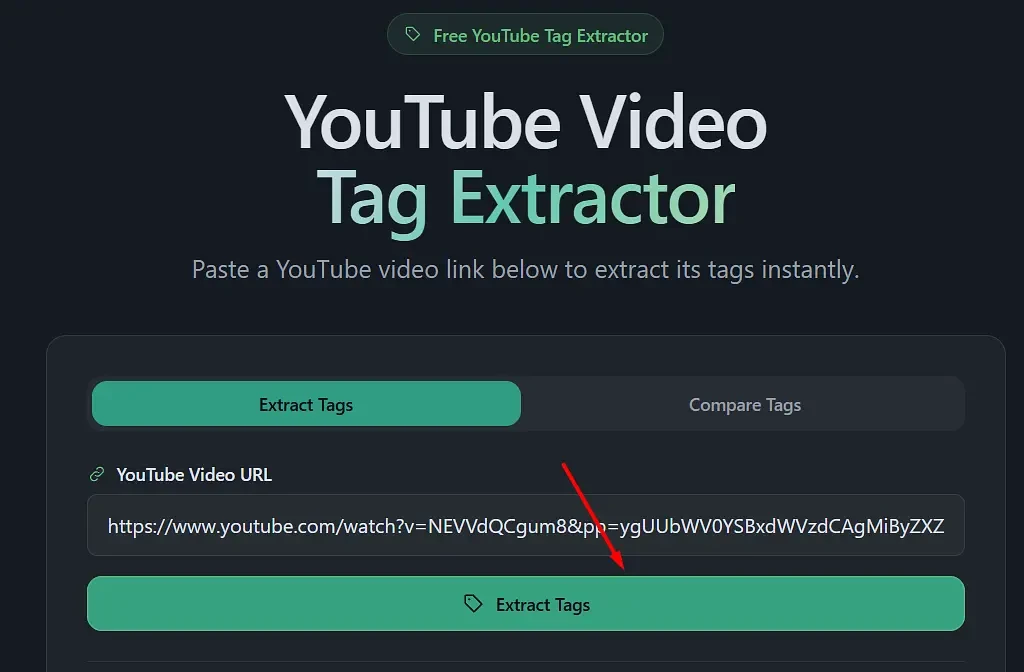
If you want to find out what tags your competitors use (or the tags of any video, for that matter), you can use our free tool that extracts them. The tags above were taken directly from one of the videos on YouTube.
All you have to do is go to https://optofriend.com/youtube-video-tag-extractor, paste the URL of the video you’re interested in, and click Extract:
You will then see all the tags used in the video:
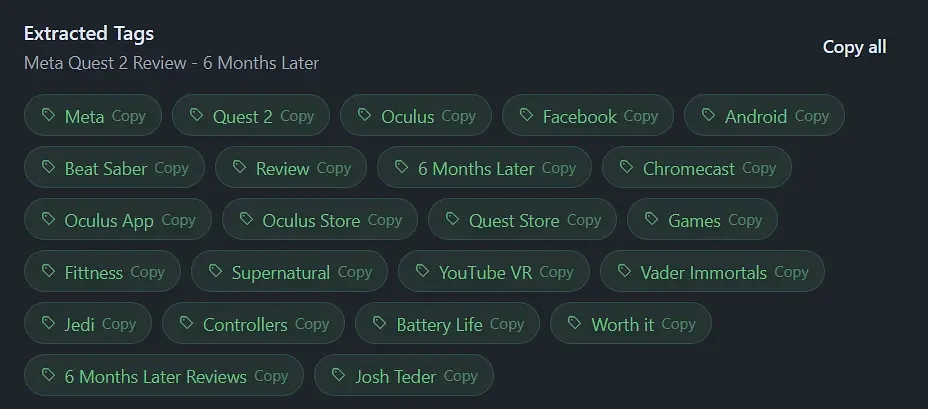
Mind you, while looking up the tags of competitors or similar videos is a good way to learn how they are used, do not copy them exactly or overstuff your tag list. For one, the official documentation explicitly states that adding excessive tags goes against YouTube’s spam policies:

Beyond that, even in the example above, some tags are irrelevant, way too broad, or simply wrong (nobody will type “Games” into search expecting to find a Meta Quest 2 review).
Before we get to the step-by-step guide on how to use YouTube tags, let’s look at where to find them.
Where to Find YouTube Video Tags (Shorts and Regular Videos)
To find YouTube video tags, go to YouTube Studio, find your video, and click “Show more” (right under Age restriction):
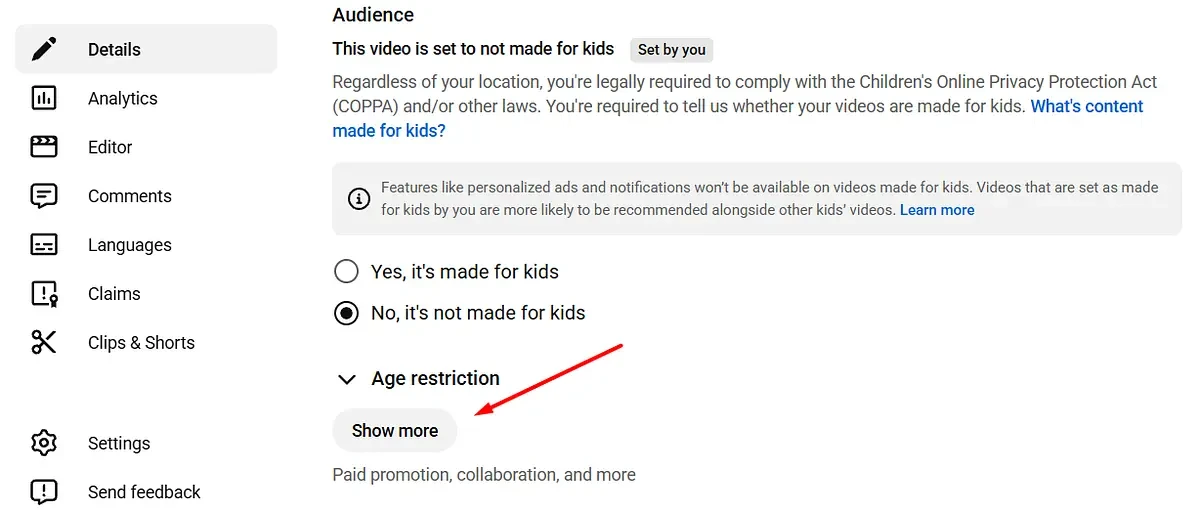
Scroll down until you see the Tags section with an input field:

How to Use YouTube Video Tags
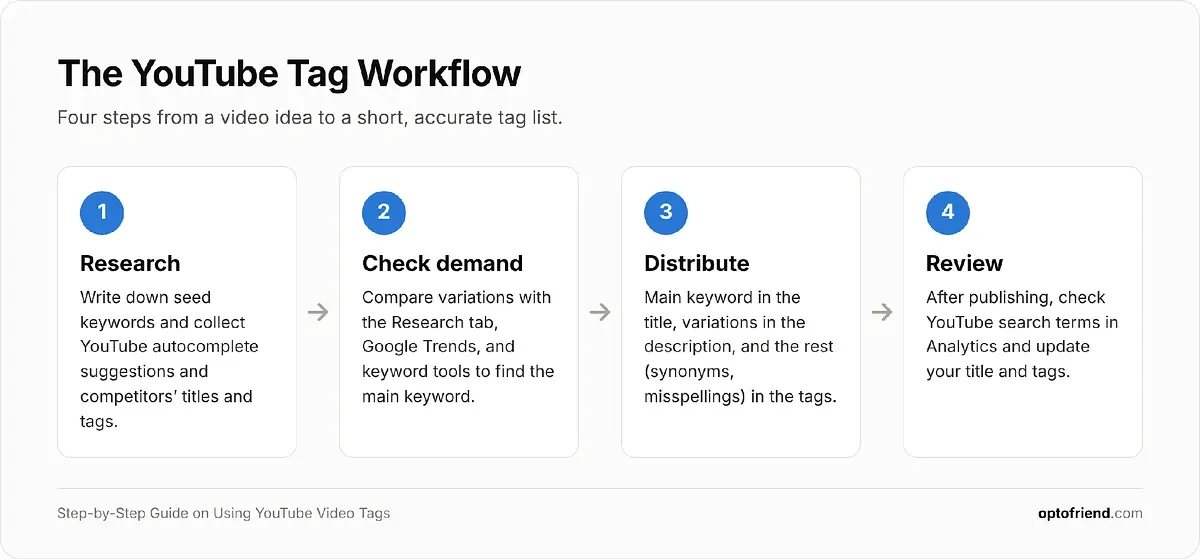
To properly optimize a YouTube video for search, tags should be used together with the title and description. Your success (outside of having great content) depends on keyword research and on using those keywords in all three: the title, the description, and the tags.
What is keyword research? In its simplest form, it means finding out which keywords people use to search for your topic or similar topics. You don’t need every possible variation, only the most common ones, since everyone phrases their searches a little differently.
Once you have that list, each keyword gets a job. The main keyword (the one with the most demand that best describes your video) goes into the title. Supporting keywords and natural variations go into the description. Whatever is left, such as synonyms, alternative names, abbreviations, and common misspellings that would look odd in a title or description, goes into the tags.
Here’s why this works. YouTube reads all of your metadata to understand what a video is about and which searches it should appear for. The title and description carry most of that weight, and they are also what viewers actually see when deciding whether to click. Tags are invisible to viewers, so they can’t help with clicks, but they can fill the gaps: they tell YouTube that your “Meta Quest 2 review” is also a match for someone who typed “Oculus Quest 2 review” or “Metaquest 2 review.”
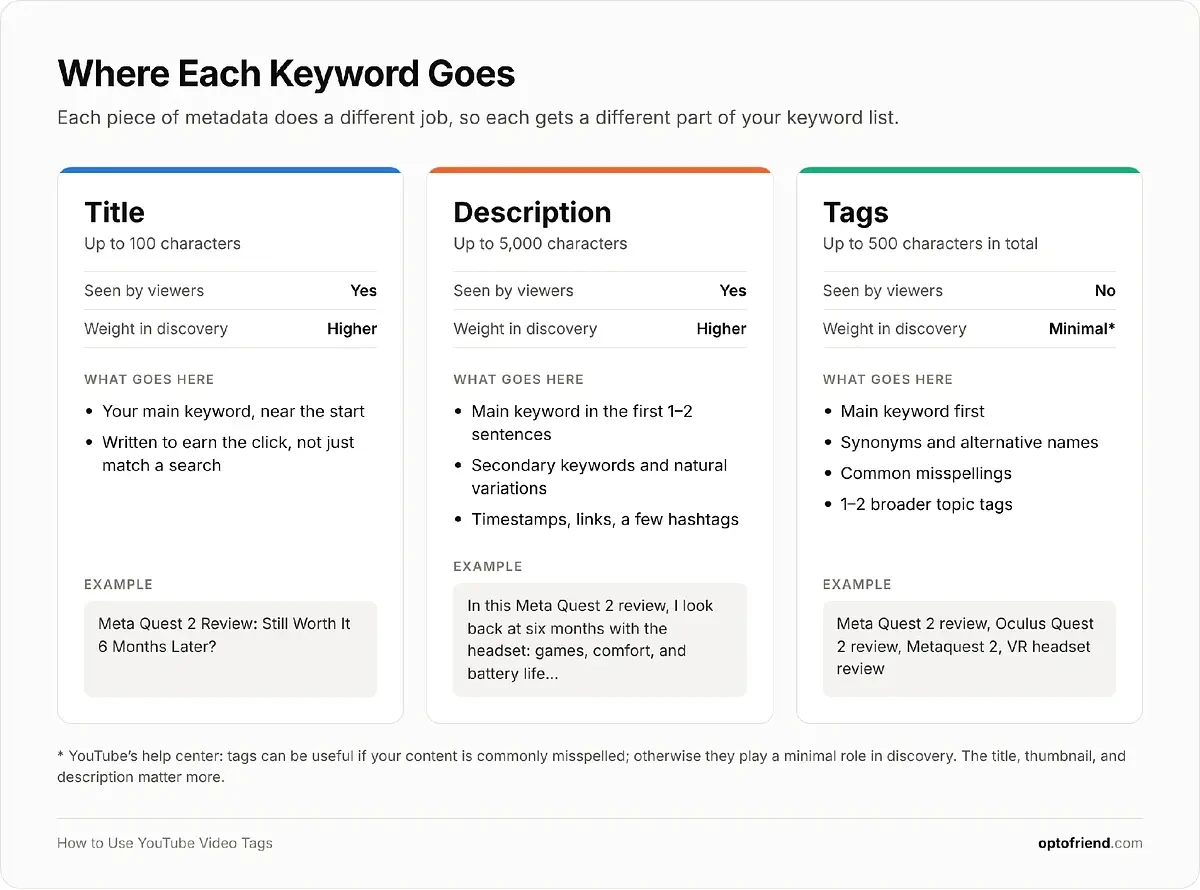
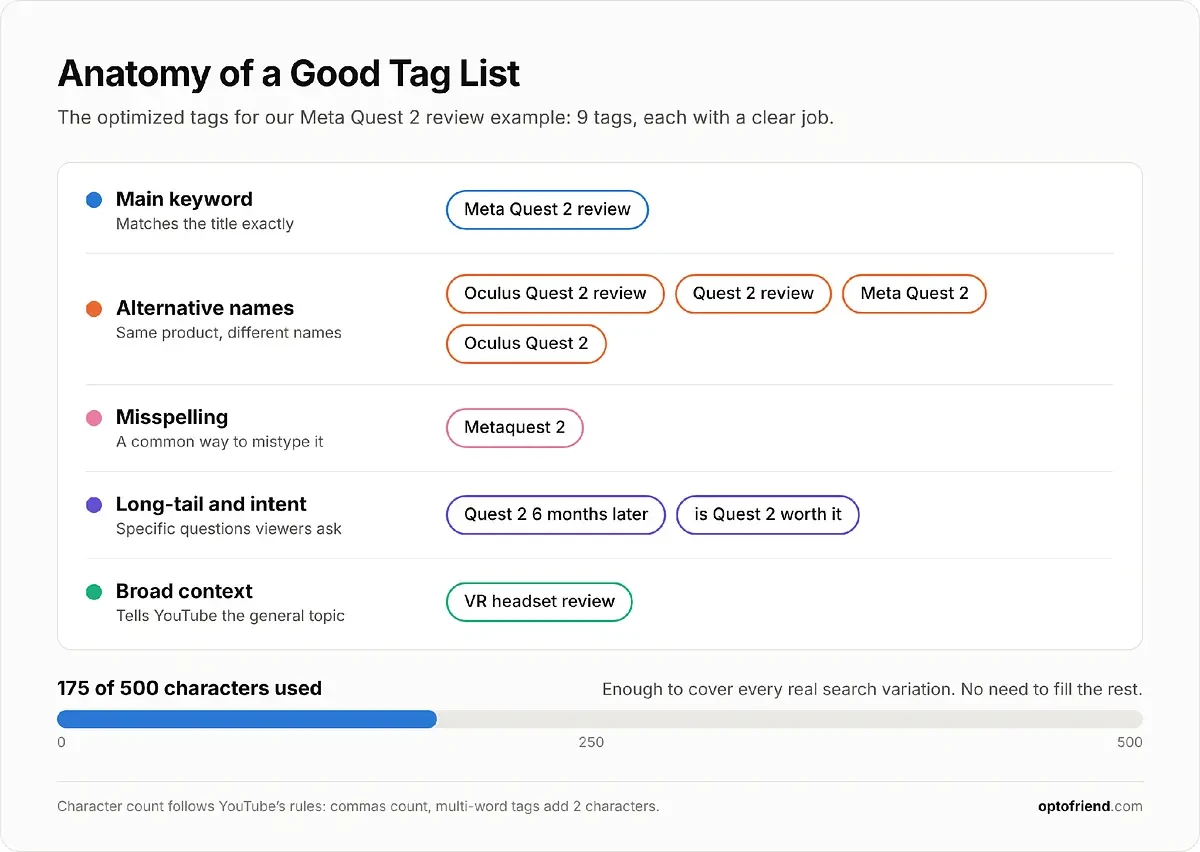
Tag optimization, then, is not about adding as many keywords as possible. It’s about choosing a small set of accurate, relevant tags that cover the ways people actually search for your video. In practice, that means you should:
Start with your main keyword, exactly as it appears in your title.
Add the variations and synonyms your keyword research turned up.
Include common misspellings and alternative names, especially for brands, products, and people.
Add one or two broader tags that describe the general topic (for example, “VR headset review”).
Add your channel or brand name if people search for it.
Stop once you’ve covered the main ways people search for the topic, even if you haven’t used all 500 characters.
Dos and Don’ts of YouTube Video Tags
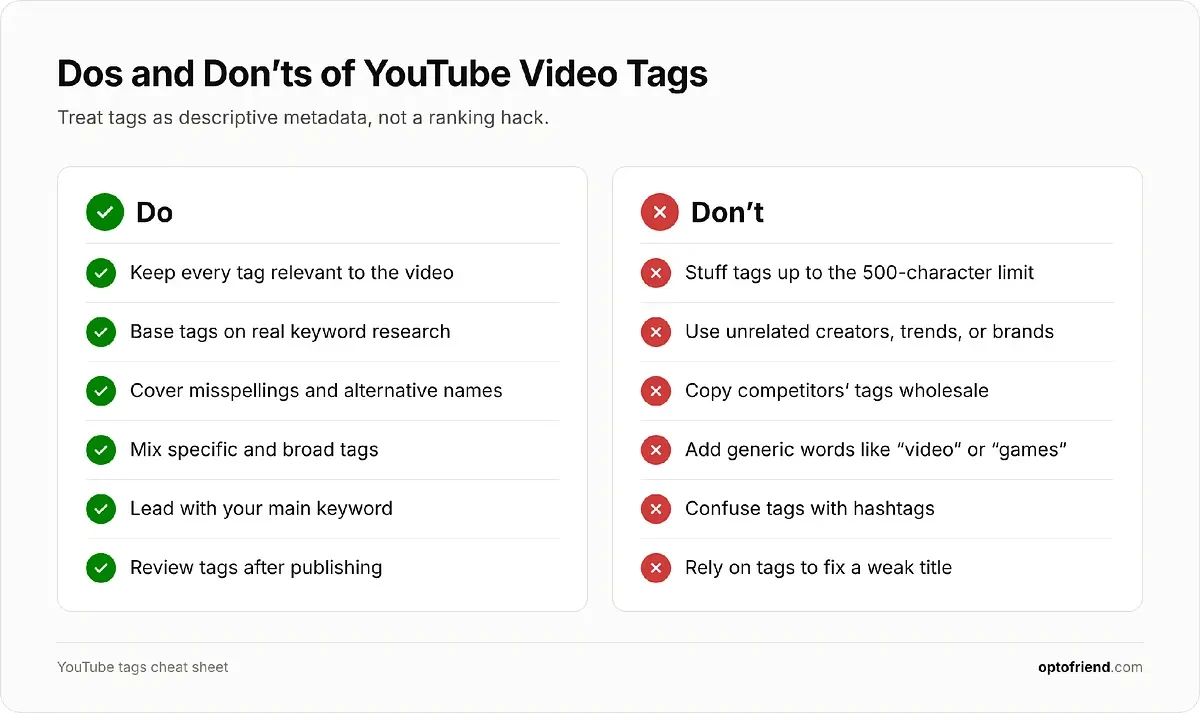
Most tag mistakes come from treating tags as a ranking hack rather than as descriptive metadata. Keep these rules in mind.
Dos:
Do keep every tag relevant. Each tag should describe something viewers will actually find in the video.
Do base your tags on keyword research. Use phrases people really type into YouTube search, not words you think sound good.
Do cover misspellings and alternative names. This is the one use case YouTube itself highlights in its documentation.
Do mix specific and broad tags. Specific tags (“Meta Quest 2 battery life”) match exact searches, while one or two broad ones (“VR headset”) give YouTube general context.
Do put your most important tag first. YouTube doesn’t confirm that tag order matters, but leading with your main keyword costs nothing and keeps your list organized.
Do review your tags after publishing. Check which search terms bring viewers to your video in YouTube Analytics and update your tags if you spot new variations.
Don’ts:
Don’t stuff tags. Dozens of loosely related keywords or endless variations of the same phrase won’t help, and excessive tagging goes against YouTube’s spam policies.
Don’t use misleading tags. Adding the names of popular creators, trending topics, or brands that have nothing to do with your video can get it removed, and viewers who land on it by mistake will leave right away.
Don’t copy competitors’ tags wholesale. Use them for ideas, but keep only the ones that actually describe your video.
Don’t use overly generic tags. Words like “video,” “funny,” or “games” match millions of videos and tell YouTube nothing useful about yours.
Don’t confuse tags with hashtags. Hashtags go in the title or description and are visible to viewers, while tags are hidden metadata in YouTube Studio. Also note that if a video has more than 60 hashtags, YouTube ignores all of them.
Don’t rely on tags to fix a weak title. If your main keyword isn’t in the title and description, tags alone won’t make up for it.
Why Are YouTube Tags Important
Let’s be honest: tags are not the most important part of YouTube SEO. YouTube’s own documentation says that the title, thumbnail, and description matter more for discovery, and that tags play a minimal role unless your video’s content is commonly misspelled. Still, “minimal” doesn’t mean “useless.” Tags are worth the few minutes they take for several reasons:
They catch misspellings and alternative names. Many searches contain typos or use a different name for the same thing. Tags let you match those searches without cramming awkward variations into your title.
They add context. Tags help YouTube understand what your video is about, which matters most when the topic is ambiguous. A video titled “Python for Beginners” could be about the programming language or the snake, and tags remove the guesswork.
They may help with related content. A long-standing view among SEO practitioners is that tags help YouTube connect your video to similar videos, which can lead to placements in suggested videos. YouTube doesn’t confirm this, so treat it as a possible bonus rather than a strategy.
They push you to do keyword research. Choosing good tags forces you to figure out how people search for your topic, and that research improves your title and description, which are what really drive discovery.
They cost nothing. Tags take a few minutes to add, don’t change how your video looks to viewers, and can be updated at any time.
In short, tags won’t rank a video on their own, but well-chosen tags make your metadata more complete. Before we get to choosing them step by step, let’s look at how your competitors use tags.
Understanding What Your Competitors Use in Tags
Looking at competitors’ tags is one of the fastest ways to learn how a niche describes its content. To see what that looks like in practice, we searched YouTube for three keywords from different niches and extracted the tags of every video in the results with our tag extractor:
Gaming: “zelda ocarina of time remake review” (20 videos)
Cooking: “how to cook rice” (21 videos)
Tech: “iphone duo review” (20 videos)
That gives us 61 videos with a combined 87 million views. For each one, we recorded the title, view count, and full tag list, then looked at how many tags were used, how much of the 500-character limit they took up, what kinds of tags appeared, and whether any of it lines up with views.
The Data at a Glance
Metric |
Gaming |
Cooking |
Tech |
All |
|---|---|---|---|---|
Videos analyzed |
20 |
21 |
20 |
61 |
Videos with tags |
17 (85%) |
21 (100%) |
19 (95%) |
57 (93%) |
Average tags per video* |
14.8 |
18.8 |
12.6 |
15.5 |
Median tag length, characters* |
353 |
303 |
133 |
303 |
Videos using 400+ of 500 characters* |
7 |
9 |
4 |
20 |
Exact search phrase used as a tag* |
2 of 17 |
14 of 21 |
11 of 19 |
27 of 57 |
Own channel or brand name in tags* |
15 of 17 |
14 of 21 |
16 of 19 |
45 of 57 (79%) |
Correlation of tag count with views** |
0.18 |
−0.29 |
−0.45 |
−0.04 |
Share of views held by the top 5 videos |
77% |
72% |
89% |
– |
Videos with tags only. Character counts follow YouTube’s rules: commas count, and multi-word tags count two extra characters. * Spearman rank correlation, all videos; untagged videos count as zero tags. Values close to 0 mean no relationship.
A few things stand out right away. Tags are standard practice: 57 of 61 videos (93%) use them, typically 12 to 19 per video. Most creators tag their own channel name (79% of tagged videos), and about a third (20 of 57) use 400 or more of the 500 available characters. At the same time, only cooking and tech creators regularly use the exact search phrase as a tag. In gaming, just 2 of 17 tagged videos do.
More Tags Don’t Mean More Views
If tags were a strong ranking lever, the most-viewed videos would be the most thoroughly tagged. The data says otherwise. The correlation between the number of tags and views is weak in gaming (0.18) and negative in cooking (−0.29) and tech (−0.45). Across all 61 videos, it’s essentially zero (−0.04). Here are the most-viewed videos in each category:
Category |
Video |
Views |
Tags (characters) |
|---|---|---|---|
Gaming |
The Legend of Zelda: Ocarina of Time Review |
2,004,160 |
21 (448) |
Cooking |
How To Cook Perfect Rice Every Time |
13,336,283 |
14 (110) |
Tech |
iPhone Duo Review: First Generation Fun! |
13,660,730 |
2 (32) |
Tech |
iPhone Duo is Messier Than You Think |
11,226,082 |
8 (116) |
Tech |
iPhone Duo Review: After 3,000 Folds, Here’s What We Found |
5,311,017 |
0 (0) |
The most-viewed iPhone Duo review has just two tags, and the third most-viewed has none at all. Meanwhile, the least-viewed tech video in the sample (6,618 views) has the most tags in its category: 33 tags taking up 489 characters. In cooking, the top five videos average fewer tags (15.2) than the rest (19.9).
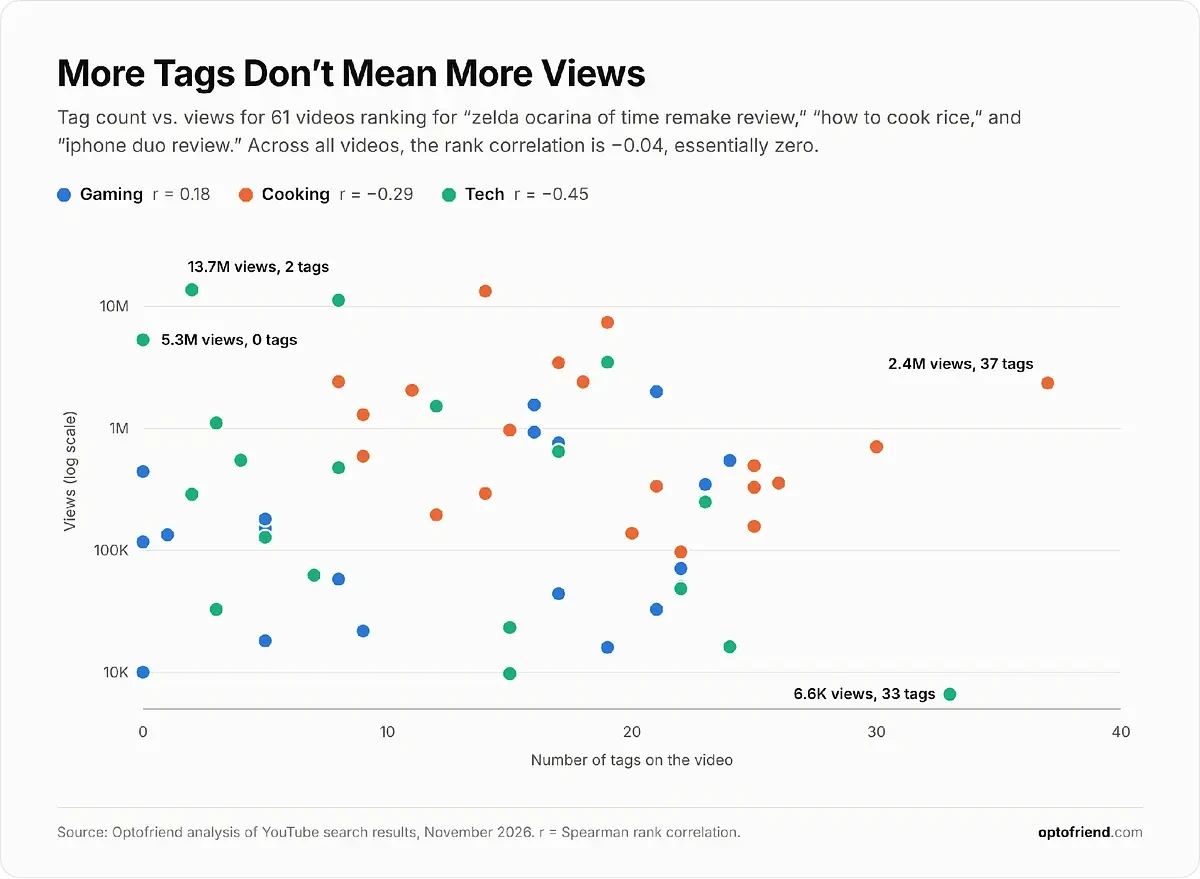
What the top videos do have in common is strong titles and large, established channels. The top five videos in each category collect between 72% and 89% of all views. All 20 tech videos have “iPhone Duo” in the title, but 5 of the 19 tagged ones don’t mention “Duo” in their tags at all, and they still rank for “iphone duo review.”
This matches how YouTube describes its own ranking. According to YouTube’s explanation of how search works, relevance is estimated by how well the title, tags, description, and video content match the query, and engagement signals are also used to determine relevance. So tags are one input among several, and YouTube’s tag documentation states directly that the title, thumbnail, and description are more important for discovery.
A word of caution: this is a small sample, and views depend on many things tags can’t capture, such as channel size, video age, and thumbnails. Correlation isn’t causation. The takeaway is not that tags hurt, but that you can’t buy views with a longer tag list.
Gaming: One Game, Many Names
The gaming results show why tags exist in the first place. The game has a long official name, and people search for it in many different ways. Instead of one exact phrase, creators spread their tags across variations: “ocarina of time remake” appears in 8 tagged videos, “the legend of zelda ocarina of time remake” in 6, “ocarina of time remake review” in 5, and only 2 use the exact search phrase. Here’s the logic behind the rest of the tags:
Abbreviations and short names. “oot,” “zelda oot,” “tloz oot,” and “ocarina remake” cover the way fans actually type the name. This is the alternative-name use case YouTube describes.
Platform and franchise context. “nintendo switch 2” and “nintendo” each appear in 7 videos, “ocarina of time switch 2” in 6.
Buyer-intent questions. “is the legend of zelda ocarina of time remake worth it,” “should i buy the legend of zelda ocarina of time remake,” “how long to beat ocarina of time,” and several “before you buy” variations.
Comparisons. “N64 vs Switch 2” and “Ocarina of Time Remake vs Original” target people deciding whether the remake is worth it.
Channel names. 15 of 17 tagged videos include the channel or brand. GamingBolt goes further and builds every tag around the full game name, from “the legend of zelda ocarina of time remake review” to “the legend of zelda ocarina of time remake review score.”
The gaming data. All 20 videos returned for “zelda ocarina of time remake review,” sorted by views:
Video |
Views |
Tags |
Characters |
Exact phrase as tag |
|---|---|---|---|---|
The Legend of Zelda: Ocarina of Time Review |
2,004,160 |
21 |
448 |
Yes |
The Legend of Zelda: Ocarina of Time Remake - Before You Buy |
1,556,619 |
16 |
438 |
No |
Zelda: Ocarina of Time Remake - BIGGEST CHANGES |
930,736 |
16 |
309 |
No |
I strongly recommend: 'The Legend of Zelda: Ocarina of Time (2026)' - Review |
758,077 |
17 |
247 |
No |
Zelda: Ocarina of Time Remake Is An Absolute MASTERPIECE |
545,013 |
24 |
480 |
No |
The Zelda: Ocarina Of Time Remake Shows That A Masterpiece Is Ageless | Review |
442,616 |
0 |
0 |
– |
Zelda: Ocarina of Time Switch 2 Review - Is It Worth It? |
346,504 |
23 |
344 |
No |
I Played Zelda: Ocarina of Time... But I Have NO Nostalgia |
180,634 |
5 |
66 |
No |
Why The Legend of Zelda: Ocarina of Time Remake Is Ridiculously Addictive |
151,943 |
5 |
231 |
No |
THE LEGEND OF ZELDA OCARINA OF TIME REVIEW - Happy Console Gamer |
134,055 |
1 |
45 |
No |
The Ocarina of Time Remake is Not a Masterpiece |
117,310 |
0 |
0 |
– |
The Legend of Zelda: Ocarina of Time Performance Review |
70,968 |
22 |
475 |
No |
The Legend of Zelda: Ocarina of Time Remake Review - Hyrule Feels New Again |
58,143 |
8 |
394 |
No |
The BAD Changes In Zelda Ocarina Of Time Remake.... |
50,654 |
22 |
488 |
No |
TLOZ Ocarina of Time Remake - Then & Now Gameplay with IGN's Original Reviewer |
44,181 |
17 |
353 |
No |
Why Ocarina of Time Remake is BETTER than ALL Modern Games |
32,760 |
21 |
484 |
Yes |
Is Ocarina of Time Still a Masterpiece? | Remake Review |
21,805 |
9 |
105 |
No |
The Legend of Zelda Ocarina of Time Remake Sold Over 5 Million Copies - Now Make a New Zelda Like It |
18,111 |
5 |
144 |
No |
The Legend of Zelda: Ocarina of Time Remake Review - The Zelda We've Been Missing |
16,008 |
19 |
438 |
No |
Is The Legend of Zelda Ocarina of Time Worth Buying? (REVIEW) |
10,027 |
0 |
0 |
– |
The 10 most common tags among the 17 tagged gaming videos:
Most common tags |
Videos using it |
|---|---|
ocarina of time remake |
8 of 17 |
nintendo |
7 of 17 |
nintendo switch 2 |
7 of 17 |
the legend of zelda ocarina of time remake |
6 of 17 |
ocarina of time switch 2 |
6 of 17 |
ocarina of time remake review |
5 of 17 |
zelda remake |
5 of 17 |
ocarina of time |
5 of 17 |
ocarina of time review |
4 of 17 |
zelda ocarina of time remake |
4 of 17 |
Cooking: Tags Follow Search Modifiers
“How to cook rice” is a short, natural phrase, and cooking creators use it directly: 14 of 21 videos have it as a tag, the highest share in our sample. The real logic, however, is in the modifiers. 18 of 21 videos tag the method, type of rice, or purpose:
Method: “how to cook rice on the stove,” “in a pot,” “without rice cooker,” “in microwave,” “in pressure cooker.”
Type of rice: “white rice” (10 videos), “basmati rice,” “jasmine rice,” “sushi rice,” “long grain rice.”
Purpose: “how to cook rice for fried rice,” “how to cook rice for biryani.”
Problems and questions: “how to fix mushy rice,” “rice to water ratio,” “Should you wash your rice?”
These tags mirror how viewers narrow down a broad query, which makes cooking a great niche to borrow tag ideas from. It’s also the niche with the heaviest tagging (18.8 tags on average, with 9 of 21 videos using 400+ characters). Yet the most-viewed video in the category, Tasty’s “How To Cook Perfect Rice Every Time” with 13.3 million views, uses 14 mostly short, generic tags like “rice,” “cooking,” and “food.”
The cooking data. All 21 videos returned for “how to cook rice,” sorted by views:
Video |
Views |
Tags |
Characters |
Exact phrase as tag |
|---|---|---|---|---|
How To Cook Perfect Rice Every Time |
13,336,283 |
14 |
110 |
No |
How To Cook The Perfect Rice | Gordon Ramsay |
7,398,878 |
19 |
393 |
Yes |
How To Cook Perfect Rice Without Pressure Cooker - 2 Ways Rice Cooking - Easy To Make Rice - Varun |
3,450,210 |
17 |
492 |
Yes |
How To Cook: White Rice on the Stove |
2,413,558 |
8 |
225 |
Yes |
How to Cook Perfect Rice without a Rice Cooker |
2,406,935 |
18 |
197 |
No |
How To Cook Boiled Rice | One Pot Chef |
2,356,671 |
37 |
270 |
No |
How To Cook Perfect Fluffy Rice | Jamie Oliver |
2,053,074 |
11 |
113 |
Yes |
This 37 minute video will change the how you think about Rice. |
1,295,149 |
9 |
201 |
Yes |
How to cook rice with A POT (better than Jamie Oliver) |
967,545 |
15 |
303 |
Yes |
How To Make The Perfect Rice |
706,388 |
30 |
498 |
Yes |
How to Cook Perfect Basmati Rice |
638,000 |
17 |
482 |
Yes |
Science: The Secrets of Cooking Rice — The Cause of Recipe Failure is Not What You Might Think |
591,304 |
9 |
81 |
No |
Never Mess Up White Rice Again | Epicurious 101 |
495,470 |
25 |
468 |
Yes |
Stop Cooking Rice This Way—Do This for Fluffy Rice Every Time | Japanese Chef |
356,458 |
26 |
447 |
Yes |
Martha Stewart's Method for Perfect Stovetop Rice |
335,334 |
21 |
495 |
No |
How To Cook White Rice Easy Simple |
328,576 |
25 |
216 |
No |
How To Make Perfect Rice Without Using a Rice Cooker (It's easy) |
293,013 |
14 |
298 |
Yes |
How to cook Rice Japanese Style in a pot 🍚 〜ご飯の炊き方〜 | easy Japanese home cooking recipe |
195,294 |
12 |
204 |
Yes |
How to Cook the Perfect Rice | Quick Tips Cowboy Kent Rollins |
157,127 |
25 |
498 |
Yes |
HOW TO COOK LONG GRAIN RICE FROM SCRATCH |
138,117 |
20 |
486 |
No |
How to Cook Perfect Rice in a Pot (EASY) |
96,842 |
22 |
489 |
Yes |
The 10 most common tags among the 21 tagged cooking videos:
Most common tags |
Videos using it |
|---|---|
rice |
15 of 21 |
how to cook rice |
14 of 21 |
white rice |
10 of 21 |
cooking |
8 of 21 |
how to cook perfect rice |
6 of 21 |
how to make rice |
6 of 21 |
how to cook rice on the stove |
5 of 21 |
perfect rice |
5 of 21 |
how to |
4 of 21 |
food |
4 of 21 |
Tech: Product, Features, and Rivals
Tech creators start with the product name and then break it down by what buyers want to know:
Product name and variants: “iphone duo” (13 videos), “iphone duo review” (11), “apple iphone duo” (6).
Features and aspects: “iphone duo battery life” (4), “camera” (3), “display” (3), “pros and cons” (3), “worth it.”
Alternative names: “iphone fold,” “foldable iPhone,” and “Apple foldable phone” catch people who describe the device instead of naming it.
Misspellings: ZONEofTECH tags “iPhone Dou,” the textbook use case from YouTube’s documentation.
Competitors and comparisons: “iPhone Duo vs iPhone 18 Pro Max,” “iPhone Duo vs Galaxy Z Fold 8,” and “samsung z fold.”
Tech also has the leanest tagging among top performers: the five most-viewed videos average 8.2 tags with a median of 101 characters. Large channels such as Dave2D (“Dave2D, Review, iPhone duo”) rely on their title, thumbnail, and audience rather than on tags.
The tech data. All 20 videos returned for “iphone duo review,” sorted by views:
Video |
Views |
Tags |
Characters |
Exact phrase as tag |
|---|---|---|---|---|
iPhone Duo Review: First Generation Fun! |
13,660,730 |
2 |
32 |
Yes |
iPhone Duo is Messier Than You Think |
11,226,082 |
8 |
116 |
Yes |
iPhone Duo Review: After 3,000 Folds, Here’s What We Found |
5,311,017 |
0 |
0 |
– |
Almost literally EVERYONE is wrong about the iPhone Duo |
3,481,231 |
19 |
199 |
No |
Apple iPhone Duo Unboxing and First Impressions |
1,521,142 |
12 |
101 |
No |
iPhone Duo Review - "Apple Knows Best" |
1,107,910 |
3 |
26 |
No |
So… I Bought an iPhone Duo |
646,592 |
17 |
133 |
No |
$3200 iPhone Duo Review - I don't recommend... |
643,467 |
17 |
331 |
Yes |
iPhone Duo review (emotional) |
548,101 |
4 |
48 |
Yes |
iPhone Duo - My Honest Review !!! |
474,849 |
8 |
66 |
No |
iPhone Duo Review: A Big Surprise |
288,187 |
2 |
33 |
No |
5 Reasons I'm Choosing iPhone Duo Over iPhone 18 Pro! |
249,042 |
23 |
496 |
Yes |
The only iPhone Duo review you need. |
128,188 |
5 |
58 |
No |
iPhone Duo Review: My favorite productivity device! |
62,535 |
7 |
146 |
Yes |
iPhone Duo VS iPhone 18 Pro Max - 2 Weeks Later! |
48,556 |
22 |
470 |
Yes |
The Critics Are Wrong About the iPhone Duo |
32,756 |
3 |
31 |
No |
iPhone Duo: 1 Week Later (Deep Dive Review) |
23,298 |
15 |
342 |
Yes |
iPhone Duo Review - Love It, but... |
16,222 |
24 |
409 |
Yes |
iPhone Duo 3 Weeks Later - The Honeymoon is Over |
9,749 |
15 |
329 |
Yes |
iPhone Duo | Two Weeks Review | Never Going Back |
6,618 |
33 |
489 |
Yes |
The 10 most common tags among the 19 tagged tech videos:
Most common tags |
Videos using it |
|---|---|
iphone duo |
13 of 19 |
iphone duo review |
11 of 19 |
apple iphone duo |
6 of 19 |
iphone |
5 of 19 |
apple |
4 of 19 |
iphone duo battery life |
4 of 19 |
folding phone |
3 of 19 |
review |
3 of 19 |
iphone duo pros and cons |
3 of 19 |
iphone duo camera |
3 of 19 |
What Not to Copy: Bad Practices in the Data
Not everything competitors do is worth repeating. The sample also contains plenty of examples of what to avoid:
Irrelevant tags. A gameplay video tags headset models (“Turtle Beach Stealth Pro II,” “SteelSeries Arctis Nova Pro”) and a store location. An iPhone review tags “amex,” “take my card,” “tmobile,” and camera models. A white rice tutorial tags “unbox,” “repair,” “chicken,” “beef,” and “turkey.” Metadata that misleads viewers or manipulates the platform falls under YouTube’s spam policy (see below).
Generic filler. “review,” “reviews,” “good,” “bad,” “good game,” “bad game,” “food,” and “dinner” match millions of videos and say nothing about yours.
Split phrases. Single-word tags are common (47 of 57 tagged videos have at least one), but splitting phrases into separate words, like “skill, up,” “how, to, make,” or “one, pot, chef,” gives YouTube nothing it can match to a real search.
Outdated tricks. “yt:cc=on” is a leftover from an old YouTube feature that turned captions on by default. It does nothing for discovery.
Misleading time tags. “upcoming video games 2026” on a review of a game that’s already out describes a different kind of video.
Filling the limit for its own sake. 20 of 57 tagged videos use 400+ characters, but none of the five most-viewed tech videos do.
For reference, YouTube’s spam, deceptive practices, and scams policy prohibits metadata designed to mislead viewers or manipulate the platform, and the tag documentation specifically notes that adding excessive tags to a video description is against these policies.
Recommendations: What to Take From Competitors and What to Ignore
Competitor tags are a research source, not a template. Based on the data and YouTube’s official guidance, here’s how to use them.
Worth taking:
The vocabulary of your niche. Variations, abbreviations, alternative names, and misspellings that several competitors repeat (like “oot” or “iphone fold”) show how real people refer to the topic.
Search modifiers and subtopics. Tags like “without rice cooker” or “iPhone Duo battery life” reveal what viewers want to know. Use them as tags, but also as ideas for your title, description, chapters, and future videos.
Comparison terms. If several competitors tag “vs” queries, viewers are making that comparison. Tag it only if your video actually covers it.
Your own brand name. 79% of tagged videos include their channel name. It’s harmless and helps viewers who search for your channel specifically.
Not worth copying:
Tag counts and lengths. There is no link between the number of tags and views in our data, and YouTube has no recommended number. Stop when your relevant variations run out.
Other channels’ names. A competitor’s name (“IGN,” “gameranx”) on your video describes their content, not yours, and counts as misleading metadata.
Generic and irrelevant tags. “review,” “food,” “good,” or product names unrelated to the video add noise and can create policy problems.
Split words, outdated tricks, and filler years. None of them help viewers find your video.
Don’t overcorrect either. The top videos with few or no tags come from large channels with strong titles and engaged audiences, and that doesn’t mean tags are pointless. YouTube still lists tags among its relevance signals, and for a smaller channel, accurate metadata is one of the few things fully under your control. Learn from competitors how your audience searches, then build your own short, accurate tag list around your title. That’s exactly what the step-by-step guide below walks you through.
Step-by-Step Guide on Using YouTube Video Tags
Now let’s put everything together. The process below works for both regular videos and Shorts, and it applies to new uploads as well as to videos you’ve already published.
Step 1: Do Keyword Research
Start with the topic of your video and write down a few seed keywords, the most obvious ways you would describe it. For the review from our example, that could be “Meta Quest 2 review,” “Oculus Quest 2 review,” and “is Quest 2 worth it.”
Then expand and check that list:
Type each seed keyword into the YouTube search bar and note the autocomplete suggestions. These are real queries people type, so they’re a reliable source of variations. Use an incognito window so your own watch history doesn’t affect the suggestions.
Look at the top-ranking videos for each keyword. Note how their titles are phrased and what tags they use (you can check them with our tag extractor).
Check the demand for each variation using the tools from Step 3. Your goal is to find out which phrase has the most searches and which ones are worth covering as secondary keywords.
Group the results into three buckets: the main keyword, secondary keywords and variations, and misspellings or alternative names.
Don’t chase every keyword you find. A dozen relevant phrases that clearly match your video are worth more than a hundred loosely related ones.
Step 2: Decide What Goes Into the Title, Description, and Tags
Now distribute the keywords you found. Each piece of metadata does a different job, so each gets a different part of your list:
Title (up to 100 characters). Use your main keyword, ideally near the beginning, and make the title read naturally. This is what viewers see first, so it has to earn the click, not just match a search. For example: “Meta Quest 2 Review: Still Worth It 6 Months Later?”
Description (up to 5,000 characters). Repeat the main keyword in the first sentence or two, since only the first lines are visible before viewers click “more.” Then work in secondary keywords naturally while describing what the video covers. Timestamps, links, and a few relevant hashtags go here as well.
Tags (up to 500 characters in total). Put your main keyword first, followed by variations, synonyms, misspellings, and one or two broader tags. This is where everything that wouldn’t fit naturally into the title or description belongs, like “Oculus Quest 2” in our example.
For the Meta Quest 2 review, the final tag list could look something like this:
Meta Quest 2 review, Oculus Quest 2 review, Quest 2 review, Meta Quest 2, Oculus Quest 2, Metaquest 2, Quest 2 6 months later, is Quest 2 worth it, VR headset review
Compare it with the list from the beginning of this article. It’s shorter, but every tag describes the video and matches a real way people could search for it.
Step 3: Use the Right Tools
You can do keyword research by hand, but tools make it faster and, more importantly, give you data instead of guesses. Here are the main options:
YouTube search autocomplete. Free and based on real searches. It shows you what people type, but not how often they type it.
Research tab in YouTube Studio. Found under Analytics, it shows what your viewers and YouTube users in general search for, along with relative search volume (high, medium, or low) and content gaps, meaning searches with few good videos. YouTube is redesigning Studio analytics in 2026, so the exact location of this tab may differ on your account.
YouTube Analytics traffic sources. For videos you’ve already published, the YouTube search traffic source report shows the exact terms viewers used to find them. It’s the best way to check whether your title and tags match real searches.
Google Trends. Switch the search type to YouTube Search to compare the popularity of different variations over time. This is how you can find out whether more people search for “Meta Quest 2” or “Oculus Quest 2.”
Third-party keyword tools. Tools like vidIQ, TubeBuddy, Ahrefs Keywords Explorer, and Keyword Tool estimate search volume and competition for YouTube keywords and suggest related phrases. Keep in mind that their numbers are estimates, not data from YouTube.
Tag extractors. Tools like our YouTube video tag extractor show the tags of any video, so you can see how top-ranking competitors describe their content.
Why bother with tools at all? Because YouTube itself shows only part of the picture. Autocomplete gives you phrases without numbers, the Research tab gives you rough volume ranges, and your analytics only cover videos that are already published. Tools fill these gaps: they show which variation is more popular, how hard it is to rank for, and what your competitors are doing, so your title, description, and tags are based on data rather than intuition.
The downside is that using all of them means jumping between half a dozen tabs, extensions, and spreadsheets for every video. That’s where Optofriend comes in. Besides the tag extractor you saw at the beginning of this article, it includes tools that help you optimize your tags without the tab-hopping. In the next section, we’ll show you how to use Optofriend for tag optimization step by step.
How to Optimize YouTube Video Tags With Optofriend
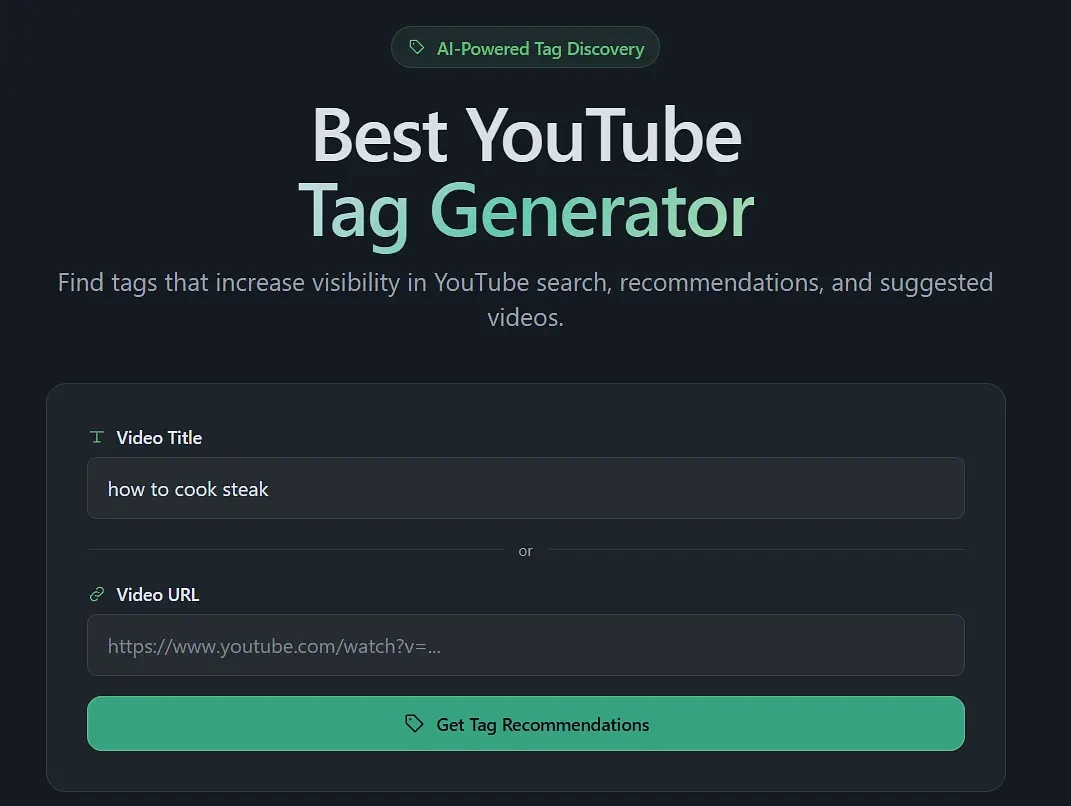
We’ve simplified the process to the bare essentials: paste the link to an existing video you want analyzed, or enter the topic (or main keyword) of your video, and the tag list will be prepared automatically.
Step 1: Enter a Video URL or Topic
Go to https://optofriend.com/tag-recommendations and enter a title, keyword, or video idea, or paste the URL of an existing video:
Step 2: Generate Tag Recommendations
Click “Get Tag Recommendations” and wait for our system to generate a tag list:
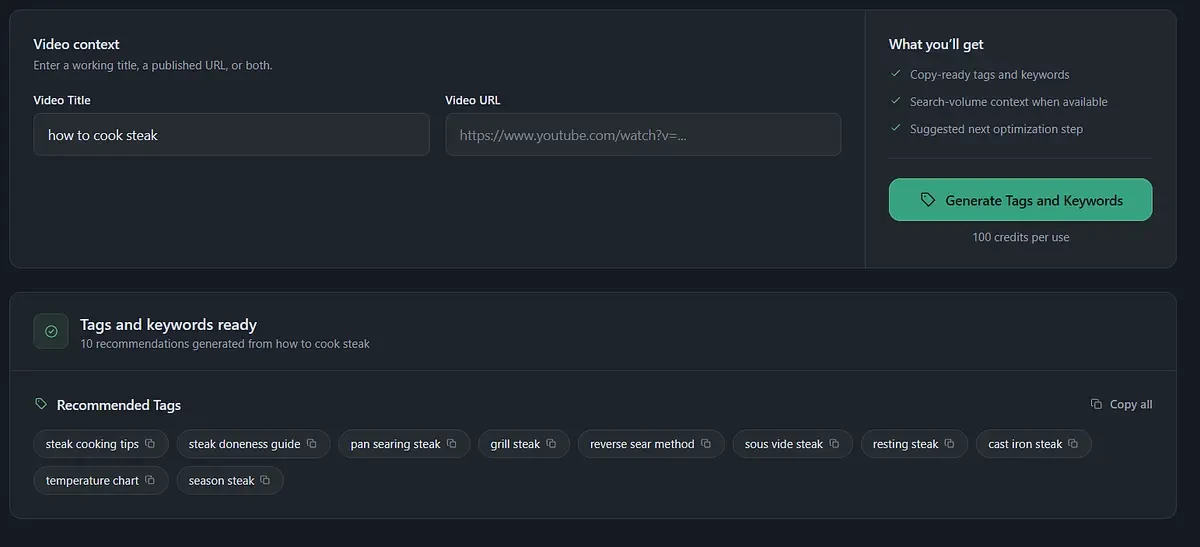
Step 3: Review and Copy the Tags
Review the generated tags and check that they match your video:
steak cooking tips, steak doneness guide, pan searing steak, grill steak, reverse sear method, sous vide steak, resting steak, cast iron steak, temperature chart, season steak
Remove any tags that don’t describe your video, then copy the list and paste it into the Tags field in YouTube Studio. If the suggestions miss the mark, click generate again to get a new set.
Conclusion
YouTube tags won’t rank a video on their own. YouTube says outright that the title, thumbnail, and description matter more, and our analysis of 61 top-ranking videos backs that up: the number of tags had no link to views. Used correctly, though, tags still do a useful job. They help YouTube match your video to misspellings, abbreviations, and alternative names that don’t fit naturally into your title or description.
So treat tags as the last step of good keyword research, not a shortcut. Find out how people actually search for your topic, put the main keyword in your title, work the variations into your description, and use tags to cover the rest. Keep the list short, accurate, and relevant. Skip tag stuffing, competitors’ channel names, and generic filler. Look at competitors to learn your niche’s vocabulary, not to copy their tag lists.
Tools like Optofriend make this process faster. You can check what top-ranking videos use, spot the variations worth targeting, and build your own tag list in minutes instead of jumping between tabs. Add good content and a strong thumbnail, and your tags will be doing exactly what they’re meant to do: helping the right viewers find your video.